Tools, Skills, and MCP — When to Use Which (Without the Headache)
Tools, MCP, and skills sound like they're competing. They're not. Here's the simple mental model I use to know which one to reach for — and when to just combine all three.

TLDR
There are three building blocks people keep mixing up — tools, MCP, and skills. They sound like competitors. They’re not.
By the end of this you’ll know exactly which one to reach for, when they overlap, and when to just combine all three. No computer science degree required. Just a clear mental model you can actually use.
I’m no expert handing down rules from on high here — this is just the way I’ve come to think about it after getting asked the question a hundred times.

First, let’s clear up the confusion
So here’s the thing. If you’ve spent any time around AI agents lately, you’ve heard all three of these words thrown around like they’re fighting each other. “Skills killed MCP!” “You don’t need MCP anymore!” “Just use tools!”
I get asked which one to use all the time — by developers, sure, but also by folks who’ve never opened a terminal and just want their agent to do the thing. And every time, the confusion is the same.
It’s noisy out there. And honestly, the confusion makes sense — both extend the agent’s capabilities, both can connect to external services, and skills can even run scripts, which sounds a lot like what MCPs do. So no wonder people’s eyes glaze over.
But once you get the mental model, it all snaps into place. Let me show you the one sentence that does most of the heavy lifting:
MCPs give your agent capabilities. Skills teach your agent workflows. Tools are the actual things it calls.
That’s it. That’s the whole article, really. But let’s unpack each one so you know why — and more importantly, when to use which.

Tools — the actual hands of the agent
Let’s start at the bottom. A tool is a single action your AI can take. Search the web. Query a database. Send an email. Run a bit of code. That’s a tool.
Under the hood, this has been around a while — it’s often called “function calling.” Function calling, which allows LLMs to invoke predetermined functions based on user requests, is a well-established feature of modern AI models, and it’s sometimes referred to as “tool use.”
Here’s the catch, though. Normally you have to wire each tool up by hand for each AI you’re using. Without a standard, when you use a function call directly with an LLM API, you need to define model-specific function schemas — JSON descriptions of the function, acceptable parameters, and what it returns. Do that once, fine. Do it across five different AI platforms and a dozen services and — well, you see where this is going.
And that’s exactly the mess MCP showed up to clean up.
MCP — the universal adapter
Ok now here’s where things get interesting. MCP stands for Model Context Protocol. Don’t let the name scare you — it’s just an agreed-upon way for AI to plug into the outside world.
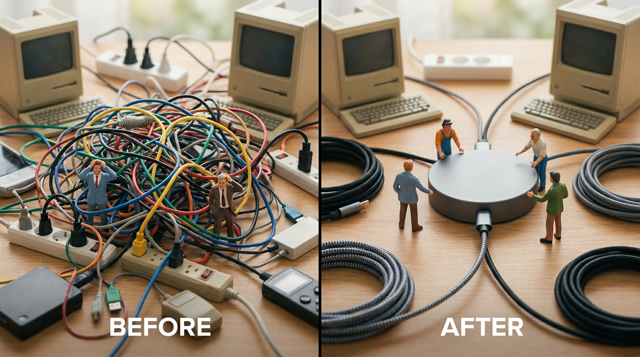
MCP is an open-source standard for connecting AI applications to external systems. The analogy everyone uses (because it’s a good one) is a USB-C port. Think of MCP like a USB-C port for AI applications — just as USB-C provides a standardized way to connect electronic devices, MCP provides a standardized way to connect AI applications to external systems.
So what problem does it actually solve? The big one. Before MCP, developers often had to build custom connectors for each data source or tool, resulting in what Anthropic described as an “N×M” data integration problem. In plain English: every AI times every service equals a nightmare of one-off integrations. MCP solves this by requiring each client and each MCP server to implement the protocol just once, reducing total integrations from N×M to N+M.
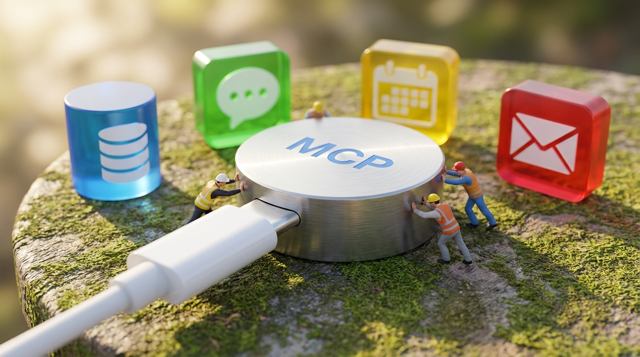
Here’s what that looks like in practice. Say you tell your agent: “Find the latest sales report in our database and email it to my manager.” The LLM understands it cannot access a database or send emails on its own, so it uses the MCP client to search for available tools, finds a database_query tool and an email_sender tool, and generates a structured request to use them. It pulls the report, then sends the email. Done.
The point: MCP is the plumbing. It exposes tools, connects to your systems, and handles the live, two-way connection. It’s the plumbing that connects the agent to the outside world by exposing tools that can read data, execute actions, and interact with external services.
It also caught on fast. Originally from Anthropic, MCP was donated to the Agentic AI Foundation — a new directed fund under the Linux Foundation anchored by Anthropic, Block, and OpenAI — on December 9, 2025. And by early 2026, the ecosystem had grown to over 10,000 MCP servers with first-class client support — GitHub, Postgres, Notion, Stripe, Figma, Brave Search, and thousands more.
So if MCP is so great — why do we even need skills? Good question. Let’s get there.
Skills — the recipe card
Here’s the part that trips people up. A skill doesn’t connect to anything. It doesn’t run a server. It’s not infrastructure at all. A skill is instructions.
Skills are folders of instructions that extend agent capabilities with specialized knowledge — instead of repeatedly explaining the same workflow, you can package it as a skill so your agent automatically knows what to do.
At the simplest level, a skill is a directory that contains a SKILL.md file, and this file must start with YAML frontmatter that contains some required metadata: name and description. That’s just a plain text file. Markdown. Stuff you can read and write yourself — no terminal required.

And here’s the clever bit, the thing that makes skills work: progressive disclosure. Sounds fancy. It’s not. It just means the agent only reads what it needs, when it needs it.
It happens in three stages. At startup, agents load only the name and description of each available skill — just enough to know when it might be relevant. When a task matches a skill’s description, the agent reads the full SKILL.md instructions into context. Then it follows the instructions, optionally executing bundled code or loading referenced files as needed.

Why does that matter? Because context is precious. Full instructions load only when a task calls for them, so agents can keep many skills on hand with only a small context footprint. You can stack up dozens of skills and your agent doesn’t get bogged down carrying all of them around at once.
And the part I love most? You don’t need to be an engineer to write one. A skill file is markdown with plain English instructions — a product manager can open one and understand what it does, a domain expert can edit one, and a non-technical team lead can create one from scratch, or ask an AI to generate it.
The person closest to the problem is now the person teaching the agent how to solve it. That’s the whole game.
The kitchen analogy that makes it click
Anthropic has a way of explaining this that I keep coming back to because it just works. Think of a kitchen.
MCP connects the agent to data — it provides the professional kitchen: access to tools, ingredients, and equipment. Skills provide the recipes — instructions that tell the agent how to use those resources to produce something valuable.
So MCP hands you the stove, the knives, the pantry. The skill is the recipe that says “here’s how we make the soup.” One gives you the gear. The other gives you the know-how.

Or, said another way: MCP doesn’t give the agent procedural knowledge about how to use those tools in your specific context — it gives the agent access to a tool, while skills tell it the right way to use it for your workflow.
”But didn’t skills kill MCP?”
You’ve probably seen this take. It made the rounds hard. And here’s the honest answer: nope.
Skills did replace MCP for some use cases — specifically, the ones that were over-engineered to begin with. But MCP didn’t die. It found its proper scope.
The data backs this up. If skills had truly killed MCP, you’d expect MCP usage to crater. Instead, both rose in parallel. By January 2026, MCP was seeing 97 million+ monthly SDK downloads and 10,000+ servers with first-class client support, while skills marketplaces filled up with tens of thousands of community skills. They’re not fighting. Skills and MCPs aren’t competing solutions to the same problem — they’re fundamentally different architectures serving different purposes.

The clean way to hold it in your head: skills are the guidance layer — reusable, filesystem-based resources that tell an agent what to do and how to do it — but skills don’t execute anything themselves. No server, no protocol, no infrastructure. MCP is the layer underneath that actually connects to your stuff.
Here’s the good news: this isn’t a debate you need to pick a side in. You just use the right tool for the job.
So when do I use which? Here’s the decision
Alright, this is the part you actually came for. Let me make it dead simple.
Reach for MCP when the problem is connectivity. You need the agent to reach something live — a database, GitHub, your CRM, an API. When you ask the agent “What’s the status of issue TRA-123?”, it can autonomously decide to call the Linear MCP to fetch that information — no skill needed, no special invocation, the capability is just there.
Reach for a skill when the problem is consistency. You want the agent to do something the same way every time. Use Skills when the problem is about knowledge consistency, not external connectivity — you want the agent to always handle a specific task the same way, like your team’s Git commit message format or a document generation procedure, without re-explaining it every session.
Use a tool directly when it’s simple and self-contained. If you’re building for just your own app or a single AI provider, you don’t need the extra layer. You can define your tools directly in the LLM call — it’s simpler, faster, and gives you full control over execution. MCP earns its keep when you want your context and tools to be shared across many apps, models, or environments.
Here’s a quick gut-check table:
| Question | Reach for |
|---|---|
| ”Does the agent need to reach a live system?” | MCP |
| ”Do I want this done the same way every time?” | Skill |
| ”Is this one simple action for one app I control?” | Tool (direct) |
| “Do I need both connectivity and a repeatable process?” | All three |
That last row is the real world, by the way. Most good setups use them together.

The best part: they work together
Here’s where it really clicks. You don’t choose one. The strongest setups I’ve built layer all three.
Here’s a real one: use MCP to connect to GitHub and CI, then create a skill for analyzing build trends and generating the weekly report. MCP grabs the live data. The skill knows what to do with it — the same way, every time. The tools do the actual work. Everybody’s playing their position.

And there’s a real architectural payoff to keeping them separate. Each layer evolves independently — a domain expert can improve a skill without touching any agent, an architect can restructure a workflow without rewriting the skills, and an IT team can swap a data provider by changing an MCP URL without either the agent or the skills knowing about it.
That’s huge. Change one piece without breaking the others. That’s how you build something that lasts longer than a weekend.
A couple of honest heads-ups
I’m not going to oversell this. A few things to keep in mind before you dive in.
Skills can be slow to trigger if you write a sloppy description. The agent decides whether to use a skill based purely on that little description line. The description tells the LLM when to invoke the skill, so you need to capture the right semantics for the agent to pick it up appropriately. Write a vague one and your skill just… sits there. So spend a minute on it.
Be careful where your skills and MCP servers come from. This is the security bit, and it’s real. Use skills only from trusted sources — those you created yourself or obtained from a source you trust — because a malicious skill can direct the agent to invoke tools or execute code in ways that don’t match the skill’s stated purpose. Same goes for MCP servers. Researchers have demonstrated how malicious MCP servers can manipulate tool metadata and tool chaining to coax sensitive data exfiltration without detection. So: human in the loop, always. The AI does the heavy lifting — you make the call on what to trust.

The lines are blurring a little, and that’s fine. Anthropic recently borrowed the skills trick — that lazy-loading idea — and applied it to MCP too. In January 2026 they added MCP Tool Search, which dynamically loads MCP tools on-demand when they would consume more than 10% of context. The result was dramatic: token overhead dropped by 85% — from around 77,000 tokens to just 8,700 tokens for setups with 50+ tools. But even with that, the architectural split doesn’t disappear: MCPs expose capabilities, while skills encode repeatable workflows.

So don’t overthink the overlap. The mental model still holds.
Want to dig deeper? Start here
I always like to point folks to the source material so you’re not just taking my word for it. These are the ones I’d actually read:
- Anthropic — Equipping agents for the real world with Agent Skills — the official skills breakdown, with the PDF example that makes progressive disclosure click.
- Anthropic — Introducing the Model Context Protocol — straight from the source on what MCP is and why.
- modelcontextprotocol.io — What is MCP? — the official MCP docs, the USB-C analogy, getting-started stuff.
- Claude Platform Docs — Agent Skills Overview — the hands-on reference for actually building a SKILL.md, with the three levels of progressive disclosure laid out.
- MCPs vs Agent Skills — Damian Galarza — a practitioner’s clean “capabilities vs workflows” mental model.
- The Skills vs MCP Debate — Maxim — great on why both survived and where they actually compete.
- Anthropic — Code execution with MCP — for when you’re scaling to hundreds of tools and want to save tokens (the 98.7% reduction example).
- Anthropic — Introducing advanced tool use (MCP Tool Search) — the official write-up on the lazy-loading-for-MCP feature and the token numbers.
- Anthropic — Donating MCP and establishing the Agentic AI Foundation — the December 2025 news on MCP going to the Linux Foundation.
- agentskills.io — The open Agent Skills standard — the cross-platform spec, now adopted beyond Claude.
- Agent Skills with Anthropic — DeepLearning.AI — a free short course if you’d rather learn by doing (includes a lesson on Skills vs Tools, MCP, and Subagents).
Your move
So here’s where I’d leave you. Don’t try to learn all three at once and don’t get pulled into the “which one won” arguments online. Start small.
Pick one task you keep explaining to your AI over and over — your report format, your commit style, the way you like a summary written. Write it down as a SKILL.md. Plain English. Ten lines. That’s your first skill.
Then, the next time you wish your agent could reach something it can’t — a database, your project tracker — that’s your signal to look at an MCP server.
Tools, MCP, skills. Capabilities, connectivity, know-how. You’ve got the map now. The person who understands the problem best is the one who should be teaching the agent to solve it — and that person is you.

Frequently asked questions
- What's the difference between tools, MCP, and skills?
- A tool is a single action the agent can take, like searching the web or sending an email. MCP is a standard way to connect your agent to live external systems so those tools are available. A skill is a set of plain-text instructions that teaches the agent how to do a task the same way every time. MCP gives capabilities, skills give workflows, tools are the actual things it calls.
- Did Agent Skills replace MCP?
- No. Skills replaced MCP for some over-engineered cases, but MCP did not go away — it found its proper scope. Both adoption curves rose together. Skills are the guidance layer and don't execute anything themselves; MCP is the connectivity layer underneath. They solve different problems.
- When should I build a skill instead of using an MCP?
- Reach for a skill when the problem is consistency — you want a task done the same way every time, like your commit message format or a report procedure. Reach for MCP when the problem is connectivity — the agent needs to reach a live system like a database, GitHub, or your CRM.
- Do I need to be a developer to write a skill?
- No. A skill is just a markdown file with plain-English instructions and some required metadata (a name and description). A non-technical person can read, edit, or create one — or ask an AI to generate it.