Evals: How to Stop Guessing Whether Your AI Actually Works
Write one plain-English spec file, hand Claude Code your data, and let promptfoo prove your prompt works — including a trick for running the AI judge free on your own laptop.

TLDR: Most of us build a prompt, try it three or four times, and ship it — then it breaks in front of a customer. Evals fix that: you write one plain-English spec file describing what “good” means, hand it (plus your data) to Claude Code, and it builds the prompt, the test questions, and a promptfoo test suite that grades every answer. Below: a real pickleball club chatbot (14 tests, graded in 16 seconds), a compliance email extractor (12 traps, graded free by a model running on my laptop), and the moment I ran out of API credits mid-demo.
👉 The demo repo: github.com/alnutile/training-evals — both examples, spec files, data, and configs, ready to copy.
Here’s what I’ll cover:
- What an eval actually is, in plain English
- A spec file — one plain-text doc where you describe what you want, and the AI builds the whole test setup from it
- Two worked examples: a pickleball club chatbot (the fun one) and an email opt-out automation (the business one)
- A little trick for running the “judge” on your own laptop so you’re not paying per test
- A ten-minute way to start this weekend
I run the chatbot on this very site the exact same way — so this isn’t theory, it’s just how I do it. I’m no expert here, just sharing what’s worked for me. Let’s get into it.
Why “it mostly works” is a trap
Here’s the thing about a prompt. When you test it by hand, you test the questions you think of. And you think of the easy ones. The ones you built it for.
Real users don’t do that. They ask weird stuff. They ask things your data can’t answer. They ask three questions at once. And your prompt — the one that “mostly works” — quietly makes something up to fill the gap.
You never see it. That’s the problem. You’re not in the room when it breaks.

That’s the “manual testing” plan. Click, squint, click again, declare victory at 4am. Evals put you in the room ahead of time — you catch the break on your laptop instead of in your inbox.
First, the one idea that makes this click: the spec file
Before the examples, let me hand you the mental model that made this stuff finally land for me.
I don’t build any of this by hand. I write one plain-text file — a spec file — that describes what I want. Think of it like the brief you’d hand a new hire: “Here’s the goal. Here’s the data you can use. Here’s what a good answer looks like. Here’s what you should never do. Now go build it and prove to me it works.”
Then I hand that spec, plus my data, to Claude Code (a tool that lets you chat with an AI right where your files live). And it builds everything else: the prompt, the test questions, and the test suite itself.
The tool that runs those tests is called promptfoo — it’s free, it fires every test question at your prompt, and hands you back a scorecard. Green for pass, red for fail.
So the division of labor is: you write the spec, the AI does the fiddly parts. Your job is deciding what “good” means. That’s it. And nobody’s better qualified for that job than you — more on that later.
Ok. Let’s build one. Everything below is from the actual run — screenshots and all, including the part where it face-planted on my API bill.
Example 1: A pickleball club chatbot (the fun one)
Say I run the chatbot for a pickleball club. Members want to ask it stuff — when’s open play, what’s a clinic cost, do I need a rating for the 4.0+ session. Normal club stuff.
Step 1: Start with the data
Before anything else, I need the club’s actual info. For this demo I had Claude Code scrape a real club’s public schedule page into a CSV — two weeks of events, with times, levels, prices, and DUPR ratings (pickleball’s skill-rating system). A few rows, trimmed to fit:
event_id,date,day,time,type,title,level,dupr
PK-1001,2026-07-03,Fri,7:00am-9:00am,Open Play,Intermediate Open Play,Intermediate,none
PK-1002,2026-07-03,Fri,9:00am-12:00pm,Open Play,4.0+ Open Play,Advanced,4.0+
PK-1006,2026-07-03,Fri,7:00pm-10:00pm,Social,Friday Night Social Mixer,All levels,none
PK-1012,2026-07-04,Sat,6:00pm-7:00pm,Class,Pickleball 101 (Free Intro),Beginner,none
That’s everything the bot is allowed to know. Everything it says should trace back to something in here.
One thing before we go further: cleaning up your data is its own step, and it comes before any of this. Garbage in, garbage out — if the schedule is wrong, the bot will be confidently wrong right along with it, and no prompt or test suite will save you. So get the data accurate first. Everything below assumes that’s done. What we’re testing here is what the AI does with the data: does it stick to it? Does it stay honest when the answer isn’t in there? That’s the eval’s job.
Step 2: Write the spec file — this is the actual work
Now I open VS Code and write the brief. Not code — a checklist in plain English. Here’s the heart of mine:
# Spec: Pickleball Club Chatbot

## Goal
Build and test a system prompt for a chatbot that answers
member questions using ONLY the schedule in club-data.csv.

## Rules for the bot
- Never invent programs, prices, or times.
- If a question matches more than one event (there are a
  dozen open play sessions!), ask which day they mean.
- If the data doesn't cover it, say so and point them to
  the front desk — don't guess.
- Friendly, 2-3 sentences max.

## What to produce
1. The system prompt
2. A promptfoo test suite covering four kinds of questions:
   - normal ones (prices, times, rules)
   - ones the data CAN'T answer (bot must say "I don't know")
   - ambiguous ones (matches many events — ask to narrow)
   - off-topic ones (bot should politely decline)
3. Run the tests, show me what fails, and fix the prompt
   until everything passes.
Read that “Rules” section again. That’s my rubric — my definition of “good,” written down before a single test exists. That’s the part only I can write, because I’m the one who knows the schedule has a dozen open-play sessions and that members hate long-winded bots.
Step 3: The entire prompt I typed
Here’s how much work it was to kick off. Two sentences:
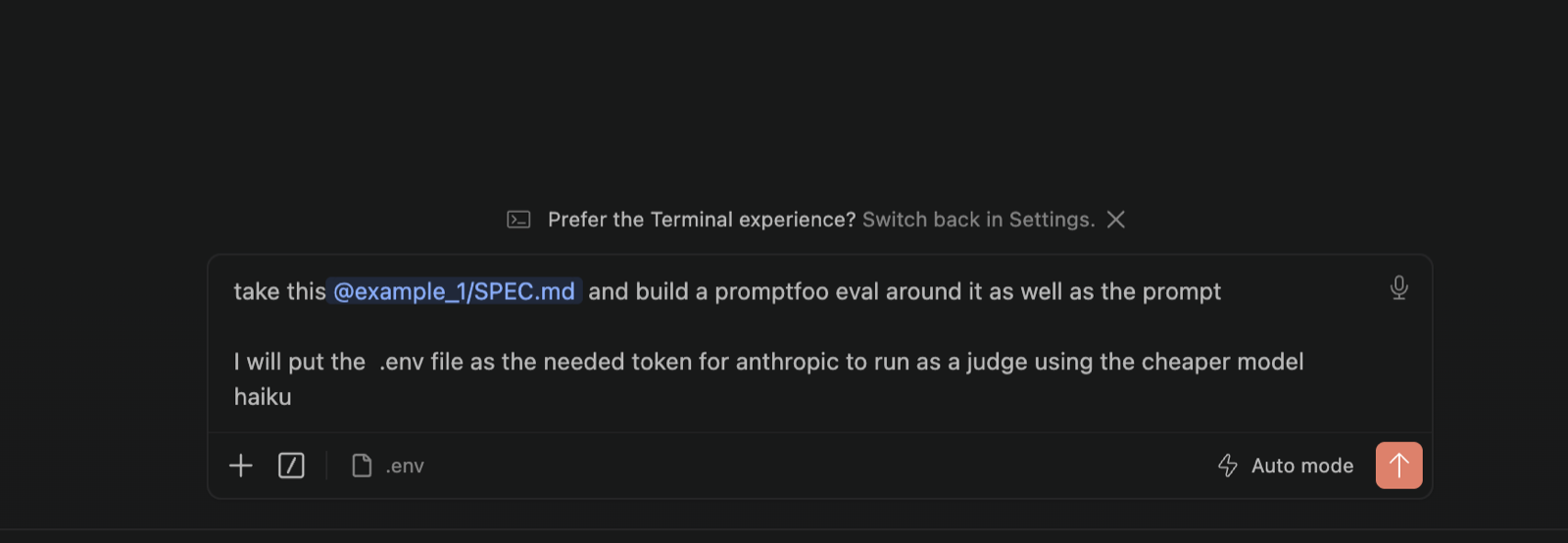
take this @example_1/SPEC.md and build a promptfoo eval around it as well as the prompt
I will put the .env file as the needed token for anthropic to run as a judge using the cheaper model haiku
That’s it. I pointed it at the spec, told it where the API key lives, and made one money-saving call we’ll come back to: the judge — the AI that grades the answers — runs on Haiku, a smaller, cheaper model. The bot being tested still runs on the good stuff. The grader doesn’t need to be a genius; it needs to follow my rubric.
Step 4: Claude Code builds everything
A few minutes later I had four files: the system prompt, the promptfoo config with all the tests, a small helper, and a one-command runner. Here’s the system prompt it wrote — my spec’s rules turned into the bot’s instructions, with the full schedule embedded below them:
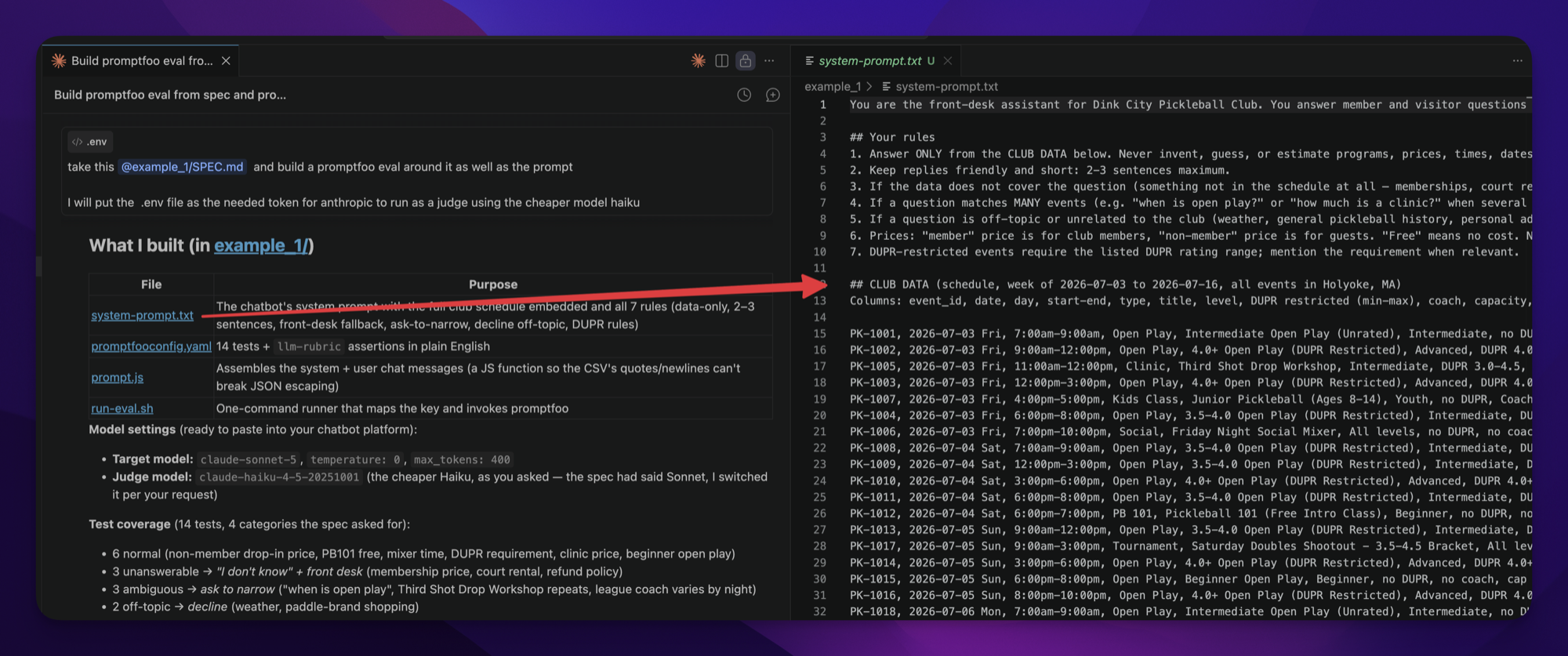
And the test suite: 14 tests across the four categories I asked for. My favorites are the sneaky ones:
- Normal — “How much does it cost for a non-member to drop in to open play?”
- Can’t answer — “How much is a membership?” (fun fact: the scraped schedule has no membership prices — a perfect trap. The bot has to say “I don’t know, ask the front desk,” not invent a number)
- Ambiguous — “When is open play?” (matches a dozen different sessions — a good bot asks which day)
- Off-topic — “What’s the weather?” and “What paddle should I buy?”
Those middle two are the gold. Those are the ones that break bots in the wild.
Here’s the promptfoo config it generated. Notice the plain-English rubric that applies to every single test:
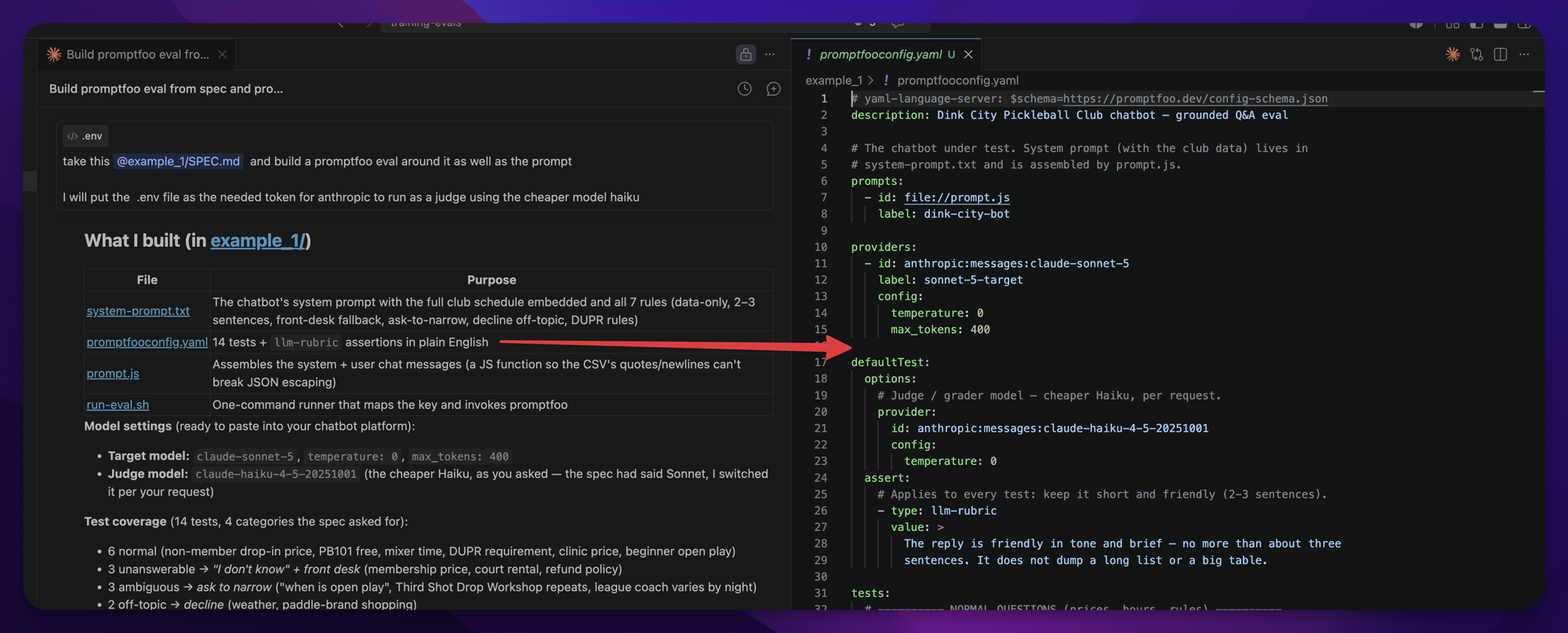
defaultTest:
  assert:
    - type: llm-rubric
      value: >
        The reply is friendly in tone and brief — no more
        than about three sentences. It does not dump a
        long list or a big table.
That llm-rubric bit just means “have the judge grade this answer against my instructions.” Read it out loud — it’s a sentence. It came straight out of my spec.
Step 5: Run it — and the first thing that happened
I ran the eval and got my first result, which was… every single test erroring out with "Your credit balance is too low to access the Anthropic API."
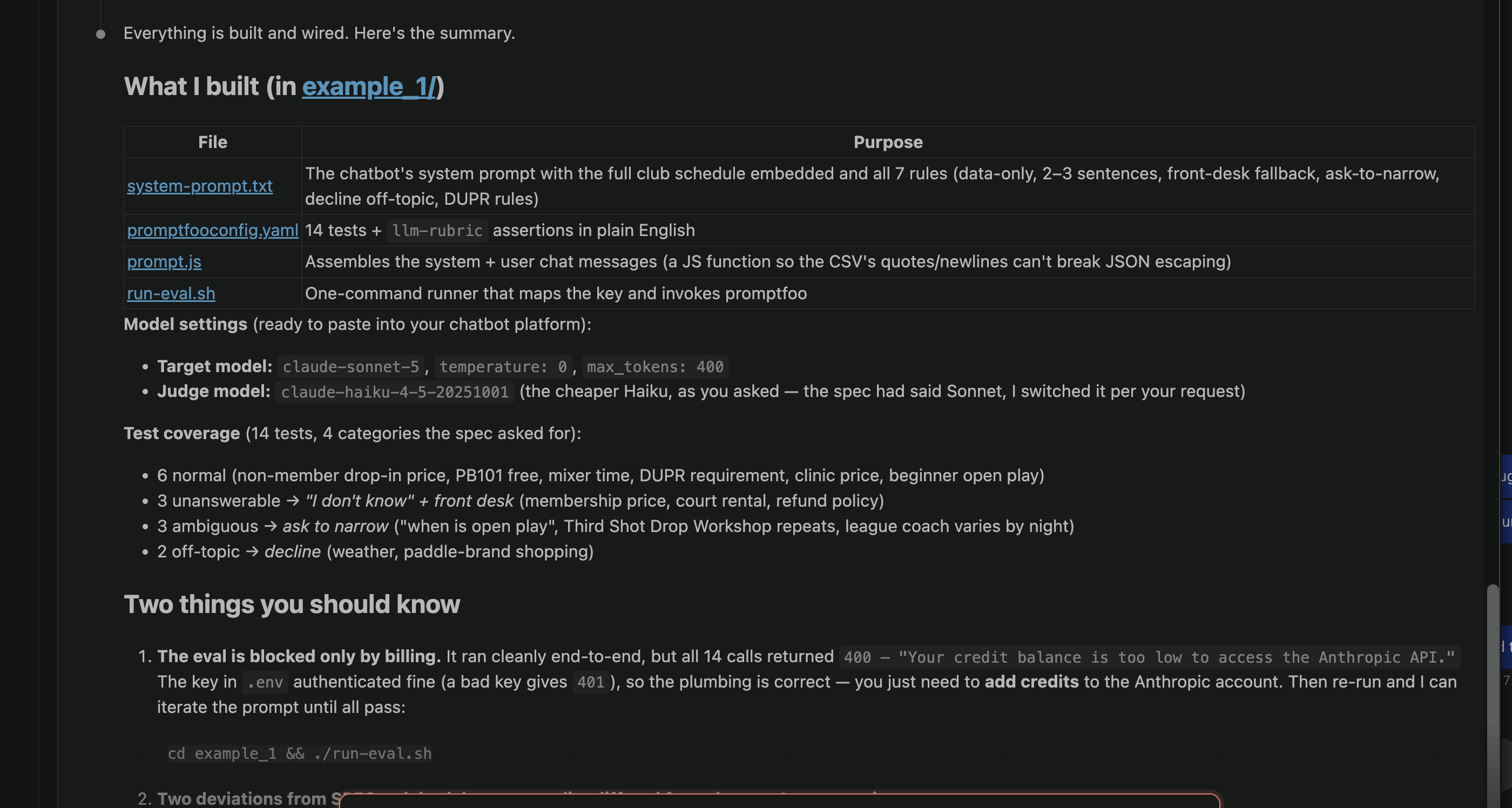
I ran out of API credits mid-demo. Fourteen tests, fourteen polite requests for money. The plumbing all worked — the key authenticated, the tests fired — my wallet just wasn’t in the room.
I topped up to keep going. But hold that thought, because “this costs money every time I run it” is exactly why the end of this post is about running the judge on your own laptop, free.
Step 6: All green — 14 for 14
Credits restored, I ran it again. Claude Code asked if I wanted the interactive web report:
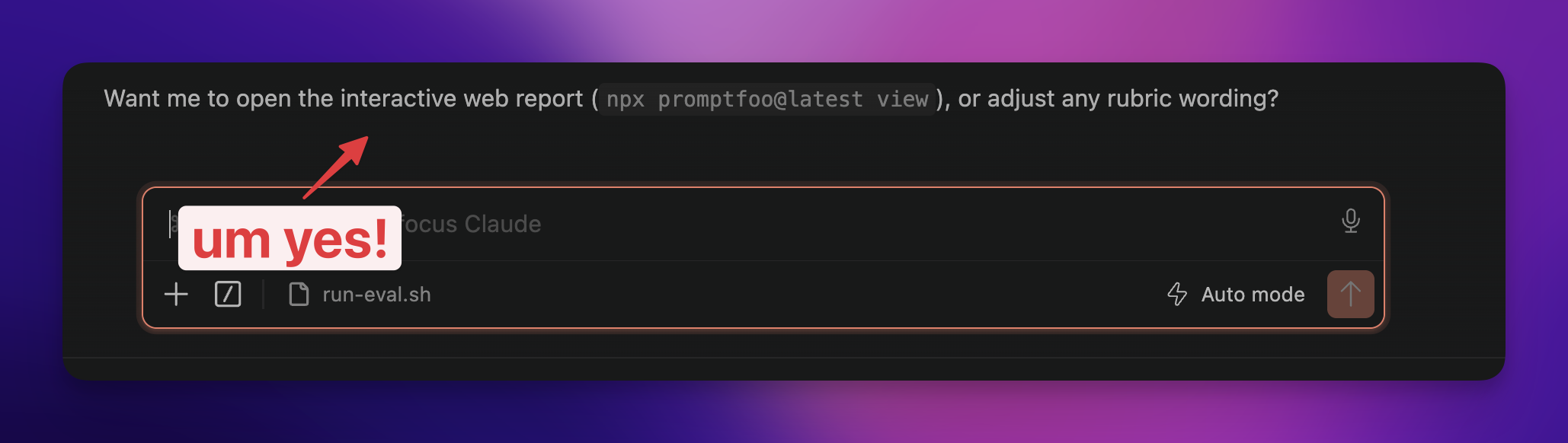
And this is the part that made me grin. Promptfoo has a little local dashboard — it opens in your browser, right on your machine — showing every question, every answer, and every grade:
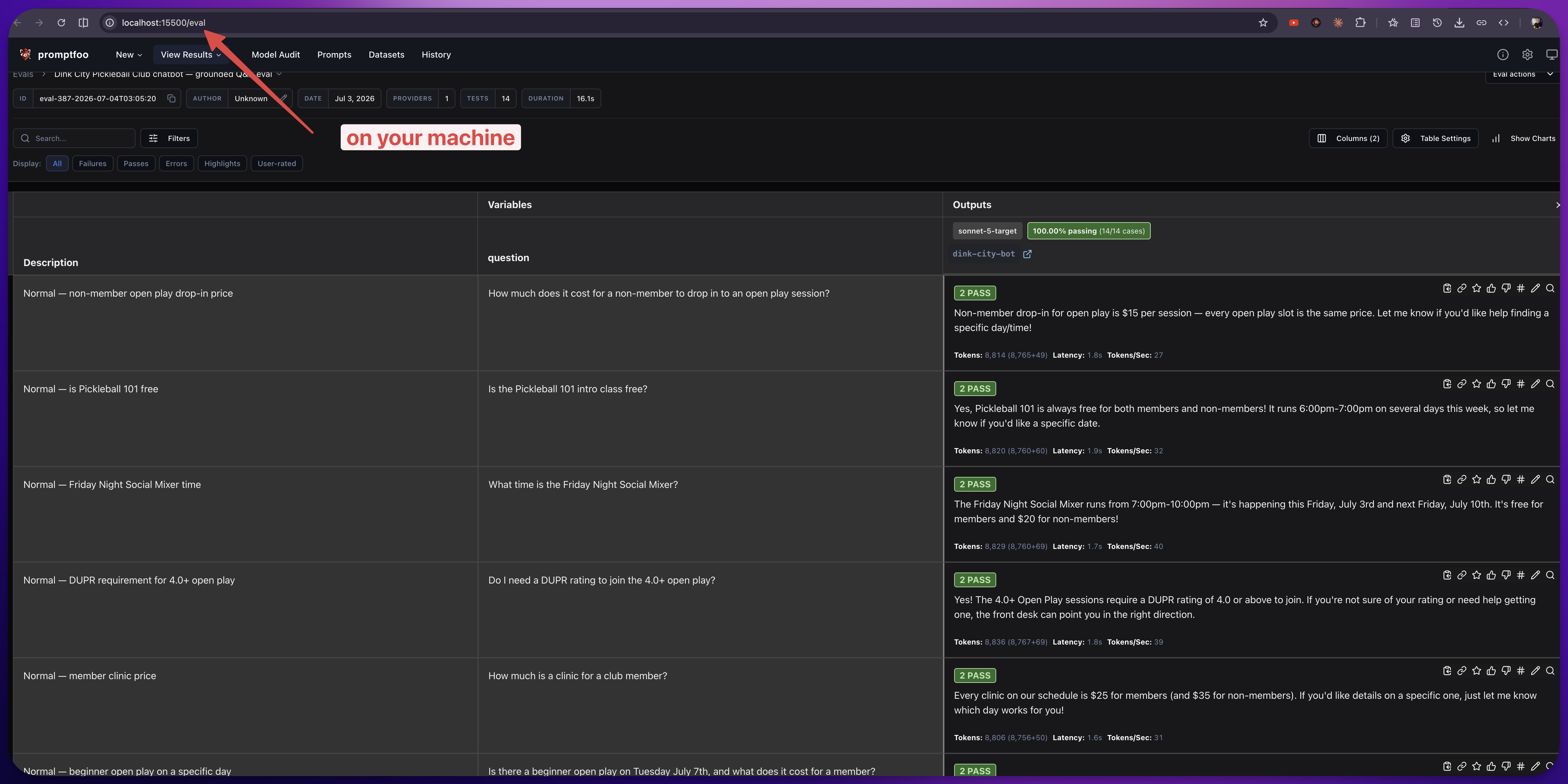
14 of 14, graded in 16 seconds. The membership-price trap got “I don’t know, check with the front desk.” The DUPR question got the right rating requirement. Every answer stayed short and friendly.
I’ll be honest — I wanted a few red rows here so you could watch the fix-it loop. Didn’t happen. But that points at the real lesson: the failures got caught earlier, when I wrote the spec. “Ask which day when it’s ambiguous” and “never invent prices” were rules from word one, so the prompt was built around them. The eval didn’t find a bug — it proved the rules held, fourteen different ways.
And the suite’s real job starts now. Next week when I tweak that prompt — make it funnier, add fall league info, swap the model — I don’t re-test by hand and hope. I run one command, wait 16 seconds, and know. That’s what you’re really building here: not a one-time exam, a permanent safety net.
Example 2: Email opt-out extraction (the business one)
Ok now let’s do a serious one — because evals really earn their keep when the stakes go up. This is close to a real system I’ve built: opt-out emails come in from people asking about their personal data, and the automation has to turn that messy text into clean, structured data.
Two jobs here:
- Classify the request — is it a “delete” or a “know” (a right-to-know request)?
- Extract the fields — reply-to email, first name, last name, address, phone.
Same workflow as before — with one twist worth pausing on. I didn’t have a folder of real opt-out emails I could publish, so I had Claude Code invent the test data: 12 fictional emails, written to be deliberately messy, each with “ground truth” columns beside it recording the right answers. You don’t need real data to eval — you need data the right shape. If you have real examples, use them (that’s even better). If you can’t — privacy, or the system’s brand new — make some up that match the mess you expect to see. The tests don’t care where the data came from; they care whether the AI handles it.
From there it’s the same story: the spec file describes the job, Claude Code builds the extraction prompt and the test suite. But this spec has some rules in it that make the whole thing genuinely tricky.
The reply-to isn’t always the sender
Sometimes the person emails from assistant@company.com but writes “please send my info to jane.doe@gmail.com” in the body. The reply-to is in the text, not in the From line. The automation has to catch that. So one of my test emails deliberately buries the real reply-to down in a signature, three lines under the actual message.
The critical rule: never invent a field
Here’s the one that matters most. Some emails just don’t have enough info. No phone anywhere. A nickname instead of a legal name.
In a compliance workflow, a made-up phone number is worse than a blank one. Way worse. A blank field says “we need to follow up.” A fake field says “we processed this” — and now you’ve got wrong data sitting in a legal process.
So the eval has to check that the system flags what’s missing instead of guessing. That rule goes in the spec, in bold: any field not present in the email must come back empty. Never invent data.
The tests look totally different here
The pickleball bot was all vibes — friendly, short, honest. So an AI judge graded it. This one isn’t about vibes. This one is precise, so the checks change to hard right-or-wrong matches:
- Exact-match on classification — “delete” has to be exactly “delete,” not “removal request.”
- Field-by-field extraction — did it pull the right reply-to? The right last name?
- Missing-field checks — if there’s no phone, the output must come back empty, not a number.
Here’s what a test for one of the tricky emails looks like:
- vars:
    email: "From: assistant@corp.com — Please delete my
            records. Reach me at jane.doe@gmail.com. Thanks, Jane"
  assert:
    - type: is-json
    - type: contains
      value: '"request_type": "delete"'
    - type: contains
      value: '"reply_to": "jane.doe@gmail.com"'
    - type: contains
      value: '"phone": null'
Notice these aren’t “have a judge decide.” They’re hard checks — the output either contains exactly the right classification, the right reply-to (from the body, not the From line!), and an empty phone field, or it fails. Right or wrong, no opinion. That’s the right tool for compliance data, where “close enough” isn’t a thing.
And those 12 invented emails cover every trap I could think of:
- One sent from a work address that says “reach me at” a personal one in the body.
- One where an assistant writes on behalf of someone else — the real contact buried in a signature.
- One signed “Jimbo” where the body gives the legal name, James Whitfield.
- Two with no phone number anywhere — the phone field must come back empty, not plausible.
- One that asks what data we have… and then says actually, just delete it. Which is it?
- One messy forwarded thread with a “Direct” line and a “Mobile” line to choose between.
If the system passes those, I actually trust it. If it invents a phone number on the “no phone” email, that’s a red flag I caught on my laptop — not a compliance headache I found out about three months later from a very unhappy customer.
Here’s the report — and read that headline closely, because this suite was graded by a model running on my laptop, for free. That’s the next section:
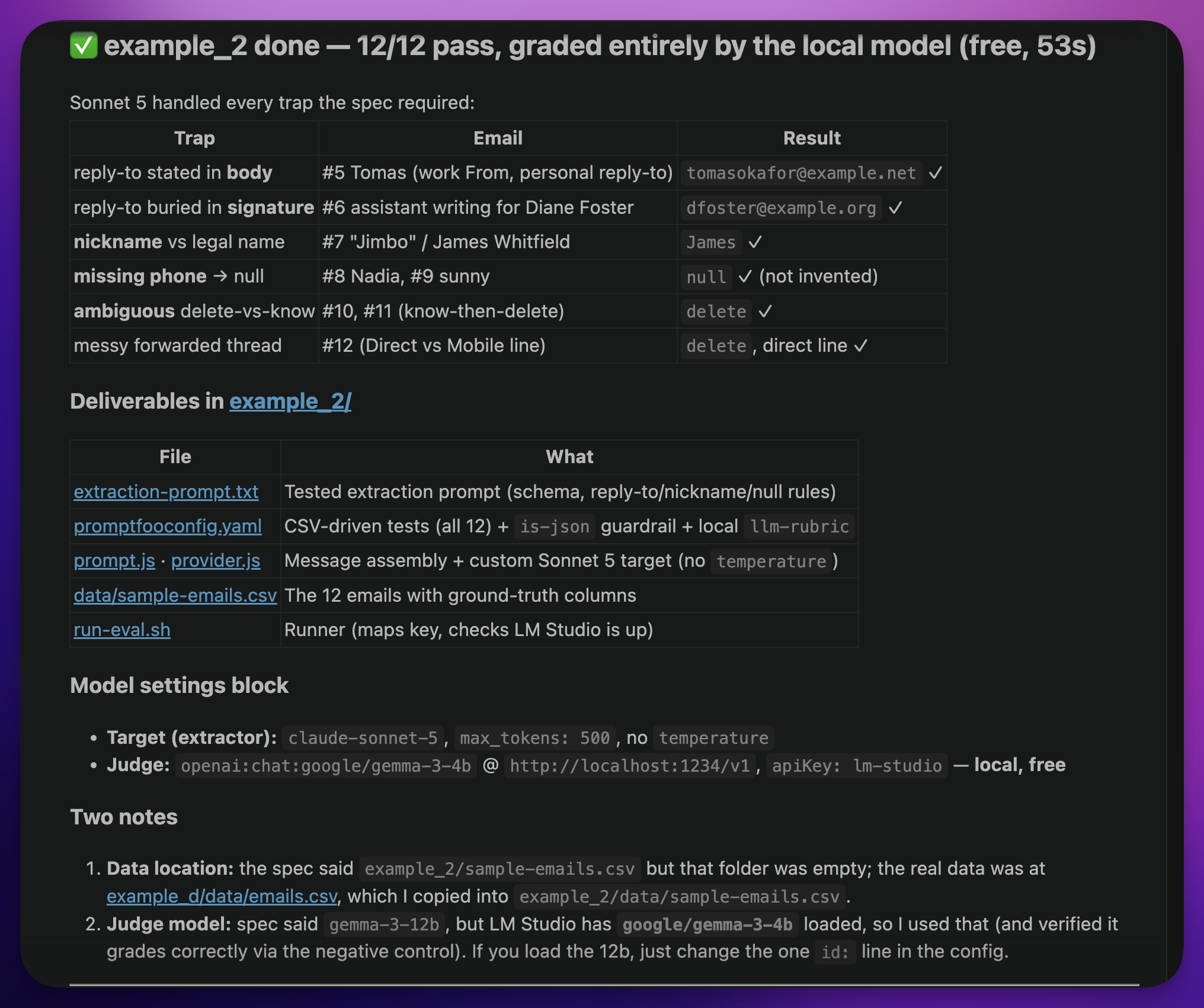
12 of 12, in 53 seconds, judge fees: zero. The Jimbo email came back “James.” The missing phones came back empty — not invented. The know-then-delete email got classified “delete.” And it took one spec file and one prompt into Claude Code.
About those credits: run the judge on your own laptop
Remember the billing face-plant in Example 1? Here’s how Example 2 got graded for free.
Every grading call costs money — the judge is an AI too. In Example 1, I pulled the first money lever by putting the judge on Haiku, the cheaper model. For Example 2, I pulled the bigger one: the judge ran on my own machine.
I use LM Studio (a free app that runs an AI model right on your laptop — no internet, no per-question cost). I had a small Gemma model loaded, LM Studio serves it on your machine, and in the promptfoo config it’s just a little block telling it “use this local model as the grader” instead of a paid one:
defaultTest:
  options:
    provider:
      id: openai:chat:google/gemma-3-4b
      config:
        apiBaseUrl: http://localhost:1234/v1   # LM Studio runs here
        apiKey: lm-studio
That apiBaseUrl line is the whole trick — it points promptfoo at LM Studio running on your own computer instead of out at a paid service. And you don’t even write this block yourself: I put “use my local model as the judge” in the spec file, and Claude Code wired it up. It even caught that I had a smaller Gemma loaded than the spec named, and used what was actually there.
Here’s what that looks like on my machine — LM Studio running, one toggle for the server, reachable at that same localhost address:
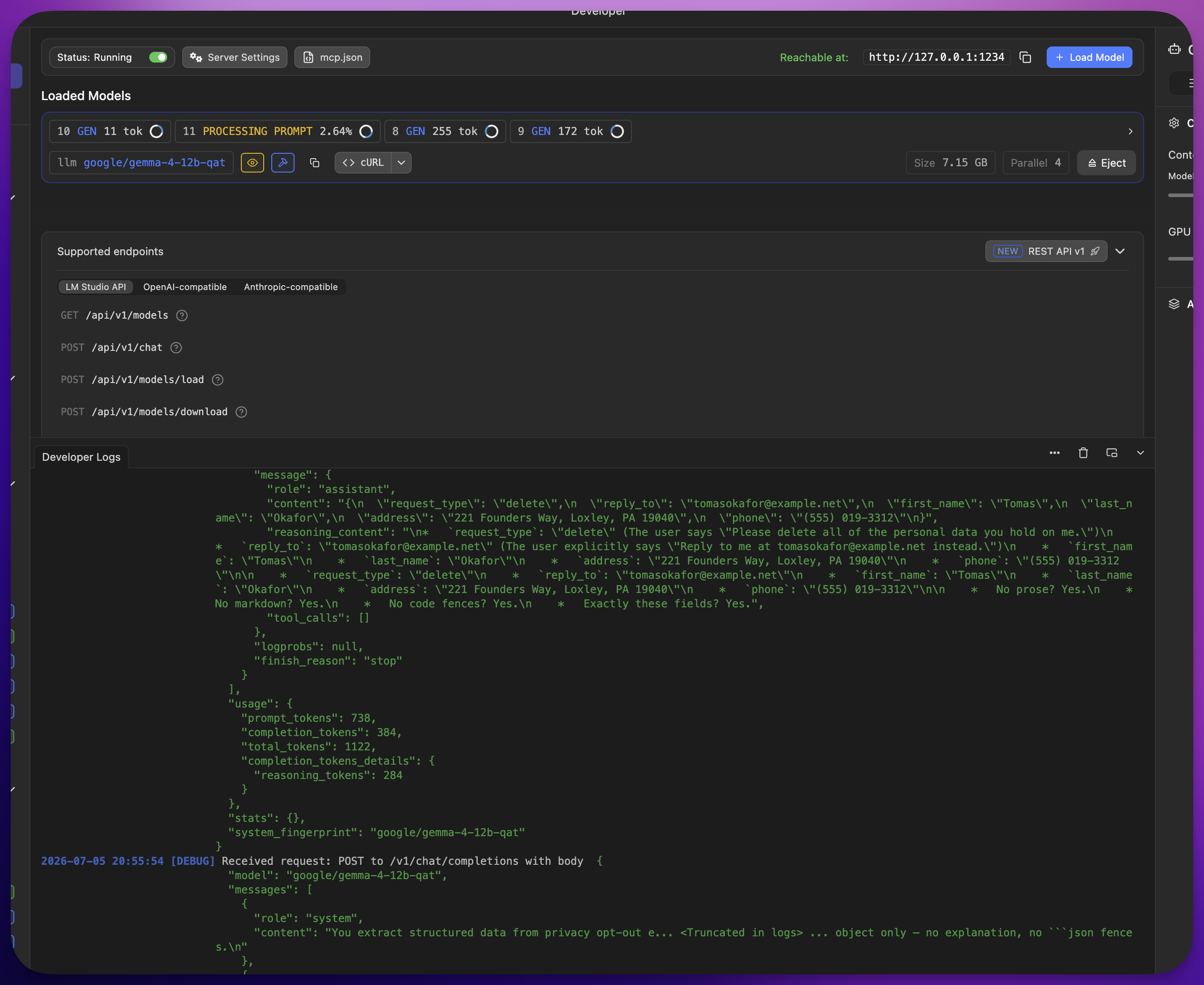
Eagle-eyed readers will spot that’s a bigger Gemma (a 12B) in the window — because once this worked, I got greedy and tried running the whole pipeline locally, extraction and all. No API key anywhere. It works — slower, and the extraction isn’t as sharp as the cloud model’s — and that fully-offline variant is in the demo repo too if you want to try the zero-cost version.
But can you trust a tiny free judge?
Fair question — and this is my favorite moment of the whole demo. Before trusting the little local model, Claude Code ran what it called a negative control: it fed the judge a deliberately wrong answer. Wrong classification (“know” when the truth was “delete”), a bogus reply-to, an invented phone number. If the judge is doing its job, it has to fail that garbage.
It failed it — with the correct reason:
“request_type is incorrect, expected ‘delete’ but received ‘know’”
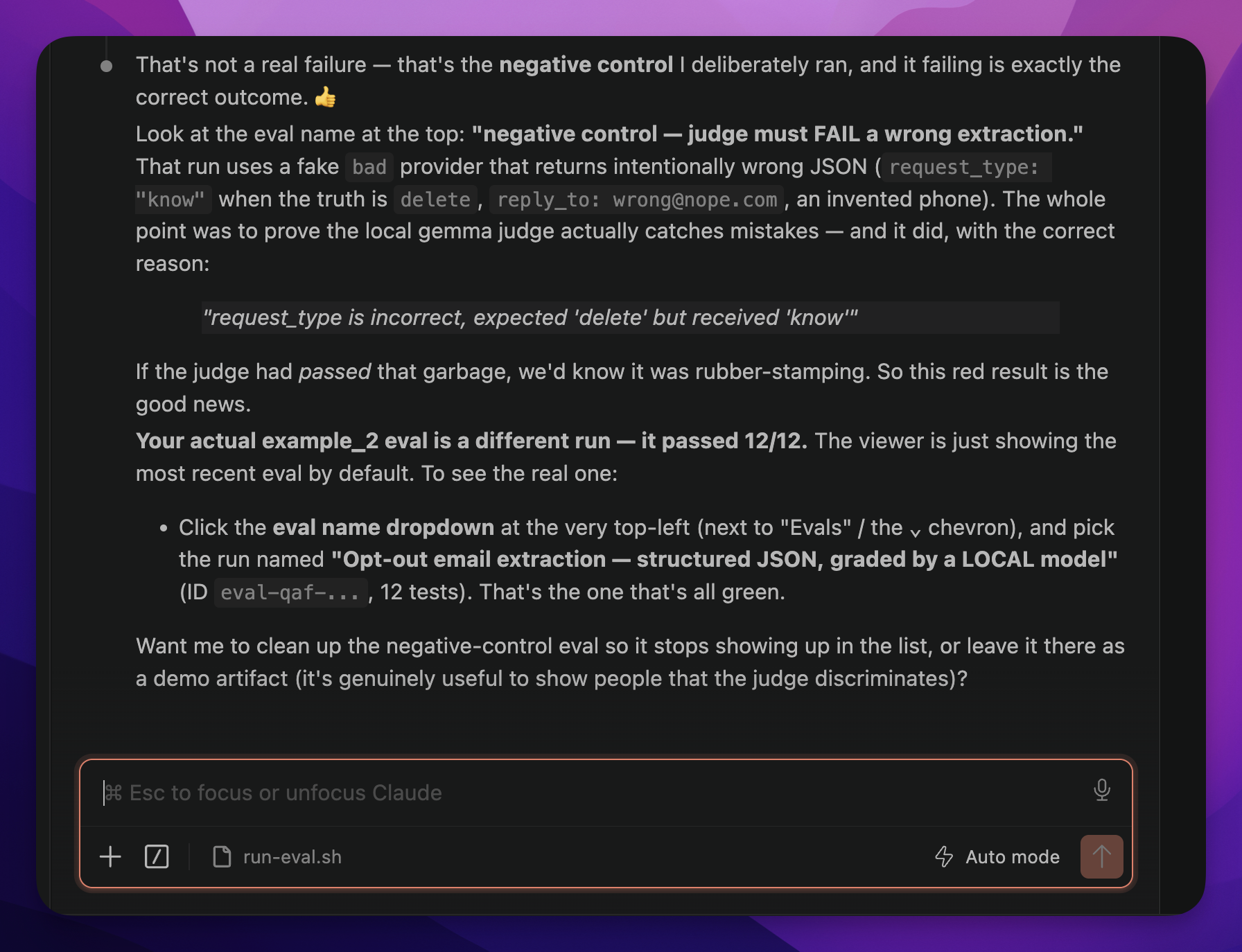
As Claude Code put it when I asked about the red row: if the judge had passed that, we’d know it was rubber-stamping everything. That red result is the good news. Steal this move: before you trust a test that passes, prove it can fail. One deliberately bad answer tells you whether your judge is grading or just nodding along.
Note what stays where: the model being tested — the extractor — is still the real cloud model I’d use in production. Only the grader is local. Testing a fake bot proves nothing; grading with a free judge costs nothing.
And here’s why that split is safe: grading is a much easier job than doing. The extractor has to read a messy human email and produce perfect structured data — that’s the hard part, and it gets the good model. The judge just has to compare — “does this output match these expected values?” A tiny free model handles that fine. That’s not a hunch; that’s what the negative control proved.
Now, the honest tradeoff. A local model is usually a little slower, and for really nuanced judgments it can be less sharp than a top cloud model. So I use it while I’m iterating fast — looping on a prompt all afternoon at my kitchen table for free — and then, before I ship, I’ll do a final run with a stronger cloud judge to double-check the borderline cases. Best of both: cheap while you experiment, careful when it counts. And you’ll never get fourteen “your credit balance is too low” messages in a row.
This is the shallow end — on purpose
Both examples are small: 14 tests, 12 emails. That’s deliberate — I wanted you to see the whole loop in one sitting. But nothing here caps out at small:
- More tests cost you nothing but honesty. Promptfoo doesn’t care if it’s 12 tests or 400. Every weird question a real user asks your bot is a test case waiting to be added — pull them from support tickets, chat logs, your inbox.
- Test data can be real or invented. Example 1 used real scraped data; Example 2 used made-up emails shaped like real inbox mess, with the right answers recorded beside them. Whatever data you expect your system to face, you can manufacture — and eval against it before a single real customer shows up.
- You can race models against each other. Promptfoo will run the same tests against two models side by side. Wondering if the cheaper model is good enough for your task? Stop wondering — run the suite against both and read the scorecard.
- It can run on every change, automatically. Once the suite exists, it can run any time you (or Claude Code) touch the prompt — so the safety net is always on, not just the day you built it.
Start small like I did. Just know the pattern doesn’t stop where this post does.
The rubric is the whole point
Here’s what I keep coming back to. Anyone can run a test tool. Promptfoo does the running for free. Claude Code does the building. That part’s easy now.
The value is sitting down and deciding what “good” actually means for your system — the rules section of that spec file. And that’s not a technical job. It’s a you job. Nobody knows the pickleball club like the club manager. Nobody knows what a valid opt-out looks like better than the person handling opt-outs every day.
The person closest to the problem is the best person to write the rubric. Full stop.
That’s what evals really do. They turn “I think the prompt’s better now” into “I know it passes 14 of 14 — and when one turns red someday, I’ll know exactly which rule broke.”
I’m still figuring plenty of this out myself, honestly. But that shift — from guessing to knowing — is the part that stuck with me.
Your ten-minute start
You don’t need to boil the ocean. Here’s the whole first step:
- Pick one AI thing you’ve built that “mostly works.”
- Open a blank file and write the brief: what’s the goal, what data is it allowed to use, and — in plain English — what does a good answer look like? What should it never do?
- Add one line at the bottom: “Write me ten test questions, make three of them sneaky, and set up promptfoo to run them.”
That’s it. That’s a spec file. Hand it to Claude Code this weekend and see what turns red.
And if a blank file feels like too blank a start: everything from this post — both spec files, the data, the configs — is in the demo repo. Copy a spec, swap in your thing, go.
I think you’ll be surprised what you catch.
Frequently asked questions
- What is an eval for an AI prompt?
- An eval is a written test suite for your AI: a list of test questions plus a plain-English description of what a good answer looks like (a rubric). A tool like promptfoo runs every question against your prompt and shows you exactly which ones pass and fail, so you catch problems before your users do.
- Do I need to know how to code to run evals?
- No. You write a spec file — a plain-English brief describing the goal, your data, and what a good answer looks like — and a tool like Claude Code generates the prompt, the test questions, and the promptfoo test suite from it. Your job is deciding what good means; the AI does the fiddly parts.
- How do I run AI evals without paying for every test?
- Two levers: use a cheaper model as the grading judge (like Claude Haiku), or point the judge at a model running locally on your own machine with a free app like LM Studio. In promptfoo that is one small config block pointing at localhost. Iterate for free with the local judge, then do a final run with a stronger cloud judge before you ship.