How to Get Your Site Found — and Cited — by AI
People don't only Google anymore — they ask ChatGPT, Perplexity, and Claude. There's a small layer of plain files that makes your site easy for those AI engines to find, trust, and quote you with a link back. I added it to this blog in an afternoon, and the AI did most of the work.
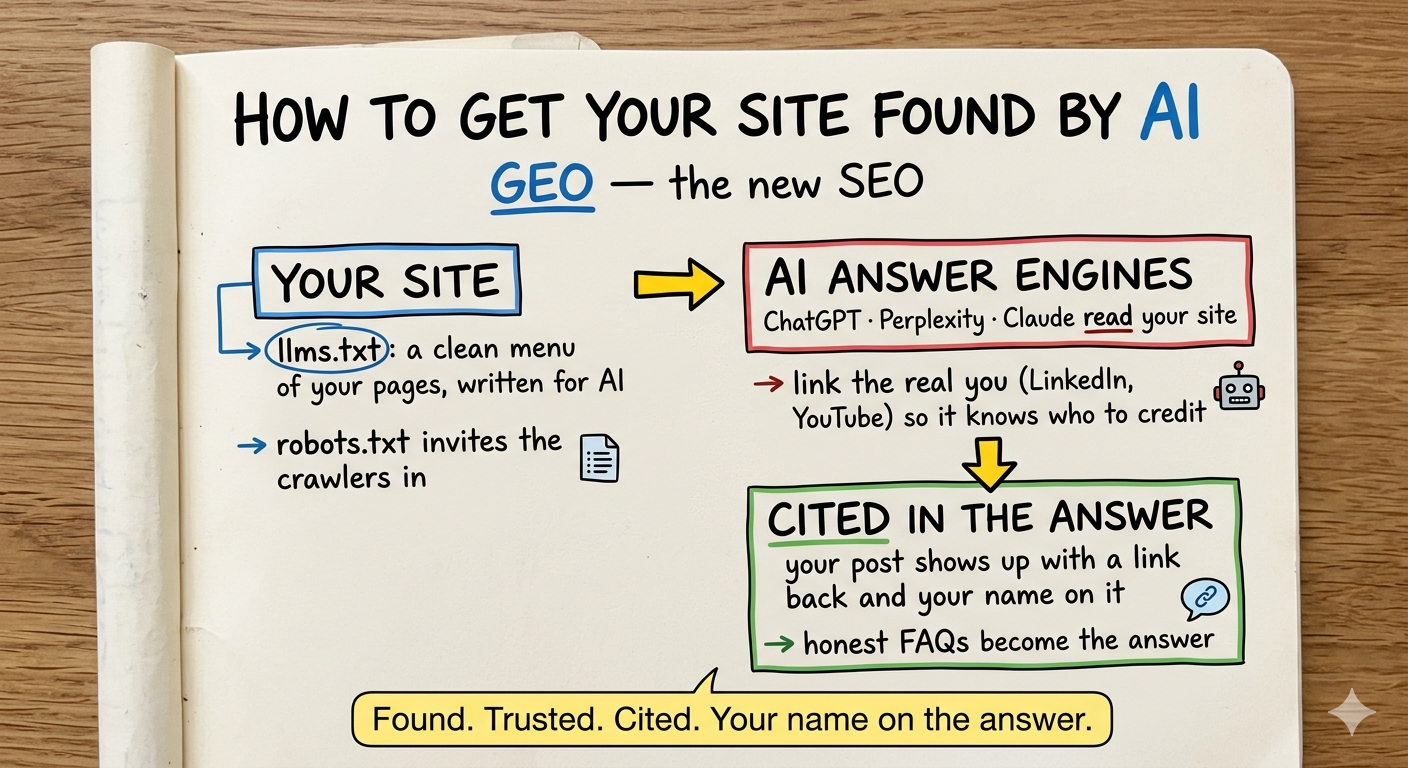
TLDR: The way people search is changing. More and more, they don’t open Google — they ask an AI. And if that AI can’t easily read your site, or doesn’t trust it, you simply don’t show up in the answer. There’s a small new layer — call it SEO for AI — that fixes this. It’s mostly a handful of plain text files and some labels. I added it to this blog in an afternoon, the AI did most of the building, and I’ll walk you through what each piece does and why.
👉 The skill: github.com/alnutile/astro-and-zapier-chat → skills/site-geo-optimization
Quick note: I’m no expert here — just sharing what worked for me, in case it helps you too.
The front door moved
Here’s the thing nobody quite announced: a lot of people stopped Googling.
They open ChatGPT and ask “what’s the best way to start with automation?” They ask Perplexity for a recommendation. They ask Claude to summarize the options. And the AI answers — sometimes with a little link back to a site it pulled from.
That link is the new front page of the internet. And the question for the rest of us is simple: when someone asks an AI about the thing you write about, does your site show up in the answer?
For most sites, the honest answer is “no idea.” Not because the content is bad — because the AI couldn’t easily find it, read it, or tell who wrote it.
There’s a name for fixing that. People call it GEO — generative engine optimization. It’s the AI-era cousin of SEO. And the good news is the basics are not a black box. It’s a few small things, and you don’t have to be the technical one to get them done.
Let me show you what I added here, in plain terms.
1. A menu written for the AI (llms.txt)
The first piece is a file called llms.txt. Don’t let the name scare you.
Think of it like the menu at a restaurant — but written for an AI instead of a person. It’s a clean, plain-text list of everything on my site: every post, with a one-line description and a link. There’s even a bigger version (llms-full.txt) that has the full text of every post in one place.
Why does this matter? When an AI wants to answer a question, it would rather read a tidy menu than dig through your website’s messy code. Hand it a clean list and it can find the right post in seconds — and link to it.
Here’s the best part: mine rebuilds itself. Every time I publish a post, it shows up on that menu automatically. I never have to touch it.
2. Actually inviting the AI in (robots.txt)
Every site has a little file called robots.txt that tells automated visitors what they’re allowed to look at. Most sites either ignore it or, sometimes by accident, block the AI crawlers.
I did the opposite. I wrote mine to explicitly say “come on in” to the AI bots — the ones from OpenAI, Perplexity, Google, and the rest. It’s the digital equivalent of leaving the porch light on. If you want to be in the answers, you have to let the answer engines read you.
3. Telling the AI who I am
This one surprised me with how much it matters.
An AI engine doesn’t just want your content — it wants to know it can trust it, and who to credit. So I added some behind-the-scenes labels that link my site to the real me: my LinkedIn, my YouTube, my GitHub, my newsletter.
That sounds small, but it’s the difference between the AI seeing “some anonymous web page” and seeing “Alfred Nutile, a real person who shows up in all these other places.” When it recognizes you as a known person, it’s far more comfortable citing your work and putting your name on it.
If you do one thing from this list, do this one. Link yourself to yourself.
4. Answering the questions out loud (FAQ)
A huge chunk of what people ask AI starts with “how do I…”
So on my how-to posts, I added a little FAQ section — the real questions people ask, with short, direct answers. And I marked them up in a way the AI can read cleanly, so when someone asks that exact question, my answer is sitting right there ready to be pulled into the response.
I also gathered all of them onto one FAQ page, so there’s a single, tidy place — for both people and AI — to get straight answers.
The trick here is honesty: the questions and answers are really on the page, for real readers. No tricks, no stuffing. The AI rewards content that actually helps, same as a human would.
The part I keep coming back to
I didn’t hand-code any of this. I described what I wanted — “make my site easy for AI to find, trust, and quote me” — and let the AI do the building. It wrote the files, added the labels, and even checked the work against a scorecard. We took the site from “fine” to about 97 out of 100 on the GEO checks.
My job was the judgment. Yes, link all my profiles. Yes, only add FAQ markup where it’s genuinely true. No, keep it simple. That’s the human-in-the-loop pattern I talk about all the time — the AI brings the speed, you bring the decisions.
Here’s where to start
You don’t need a big project. You need an afternoon and a willingness to ask.
- Add an
llms.txt— a simple menu of your pages for the AI. - Open the door to AI crawlers in your
robots.txt. - Link your site to the real you — your profiles, your name.
- Turn your “how do I…” content into honest FAQs the AI can read.
Ask your AI assistant to set these up and to check your site against the common GEO signals. Then go ask ChatGPT a question you’ve written about, and see if you show up.
The front door moved. This is how you make sure your name is still on it.
Frequently asked questions
- What is GEO and how is it different from SEO?
- SEO is about ranking in Google's list of blue links. GEO — generative engine optimization — is about being found and cited when someone asks an AI assistant like ChatGPT, Perplexity, or Claude. Same goal, new front door: you want the AI to find your content, trust it, and quote you with a link back.
- Do I need to be technical to set this up?
- No. Most of it is a few small text files and some behind-the-scenes labels on your pages. I described what I wanted and let AI do the building — my job was deciding what mattered. You can ask any capable AI assistant to add these to your site.
- What is an llms.txt file?
- Think of it as a menu written for AI — a clean, plain-text list of everything on your site, with a short description and a link for each page. It helps an answer engine quickly find the right page instead of guessing from your raw HTML.
- How do I get an AI engine to attribute content to me by name?
- Tell it who you are. Link your real profiles — LinkedIn, YouTube, GitHub, your newsletter — in your site's behind-the-scenes data so engines can recognize you as a known person and credit your work to you, not just to an anonymous page.