An Ambient Slack Agent You Actually Build Yourself
Taking the agent from the last video and plugging it into a Slack room so it listens to everything, remembers it, and wakes up a real Linux box when it needs to. Supabase for the route and the memory, Railway for the box, Zapier's SDK for the CRM.
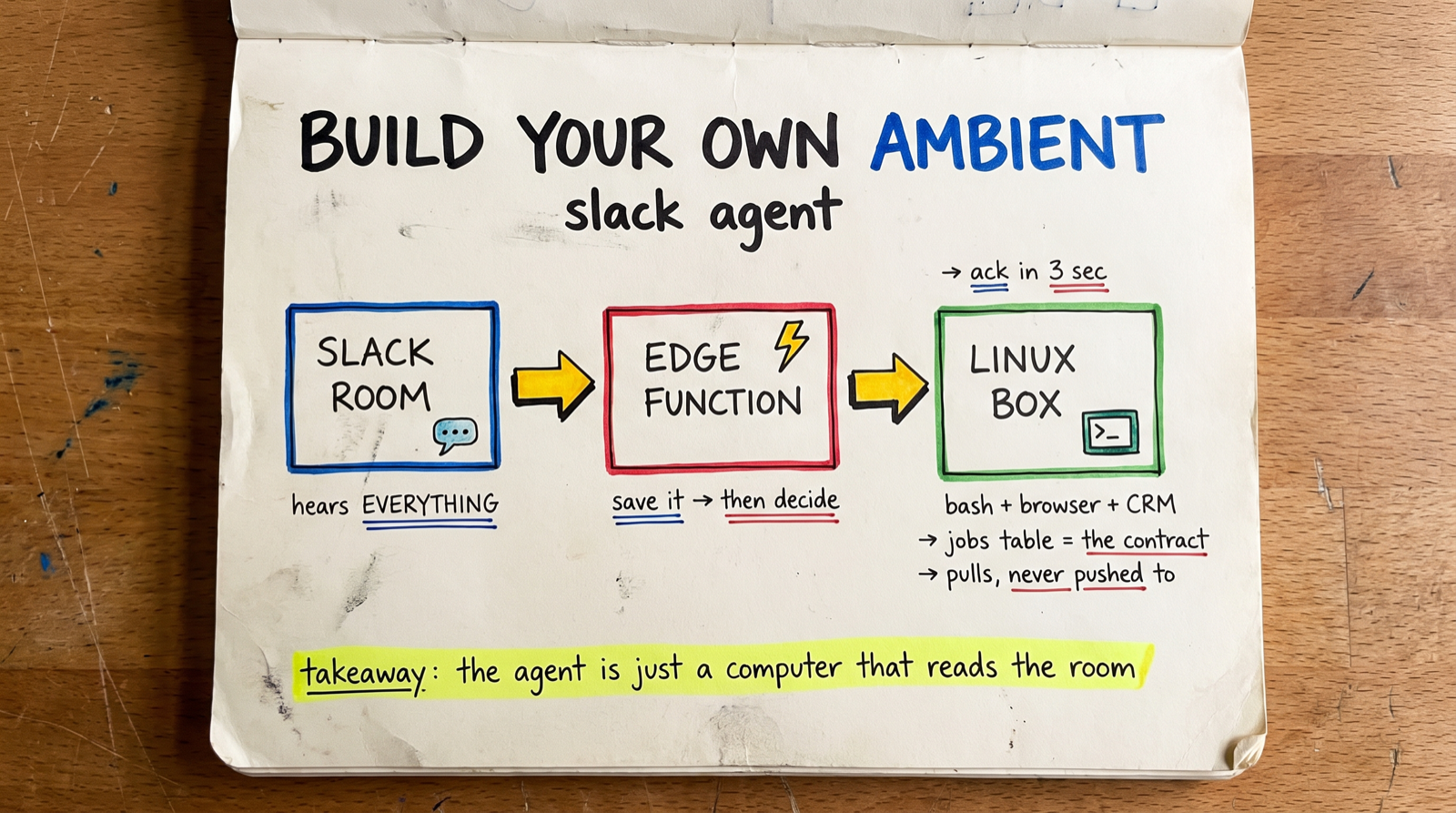
NOTE: This is not about Slack it can work in any chat system
Last video and blog post https://dailyaistudio.substack.com/p/agents-what-they-are-why-you-need I showed an AI agent that’s really just a Linux box with bash. This time we’re plugging that agent into Slack so it listens to a room. Not just when
you @ it — everything.
That’s what people call an ambient chatbot. It sits there, reads the room, builds up context. Then it acts when it makes sense, or when you ask.
There are a bunch of open-source options for this, and there’s Claude Tag. Your company will probably end up using one of those. This is for fun, and to see how the pieces actually fit. Which, honestly, is the whole point — once you know how it works you know what’s possible, even when you don’t need to know the how.
Everything here is in the repo https://github.com/alnutile/ambient-chat-claude-tag-alternative
The shape of it
Slack room (bot listening to everything)
        │  events API
        ▼
Supabase Edge Function ── the route
        │
        ├─► ALWAYS: write the message to channel memory
        │
        └─► then decide, fast:
              ├─ stay quiet
              ├─ answer right now
              └─ write a job row
                        │
                        ▼
              Railway: a Linux box with bash
                 browse, run scripts, reach the CRM
                        │
                        ▼
              jobs table ──► progress + result ──► back into the thread
Supabase is the backend — Postgres, the edge function, and later on Storage and
pg_cron when I want them. Railway runs the agent. Slack is Slack. This helps to just get going quickly with URLs we can use for incoming Slack requests and memory, jobs etc.
That’s it. Four tables and two pieces of code.
[SCREENSHOT HERE — the architecture diagram, so people can see the two lanes side by side before we get into any code]
First: the one line that makes it ambient
You add a bot to Slack, you invite it to a room, and by default it only hears
@mentions. That’s it.
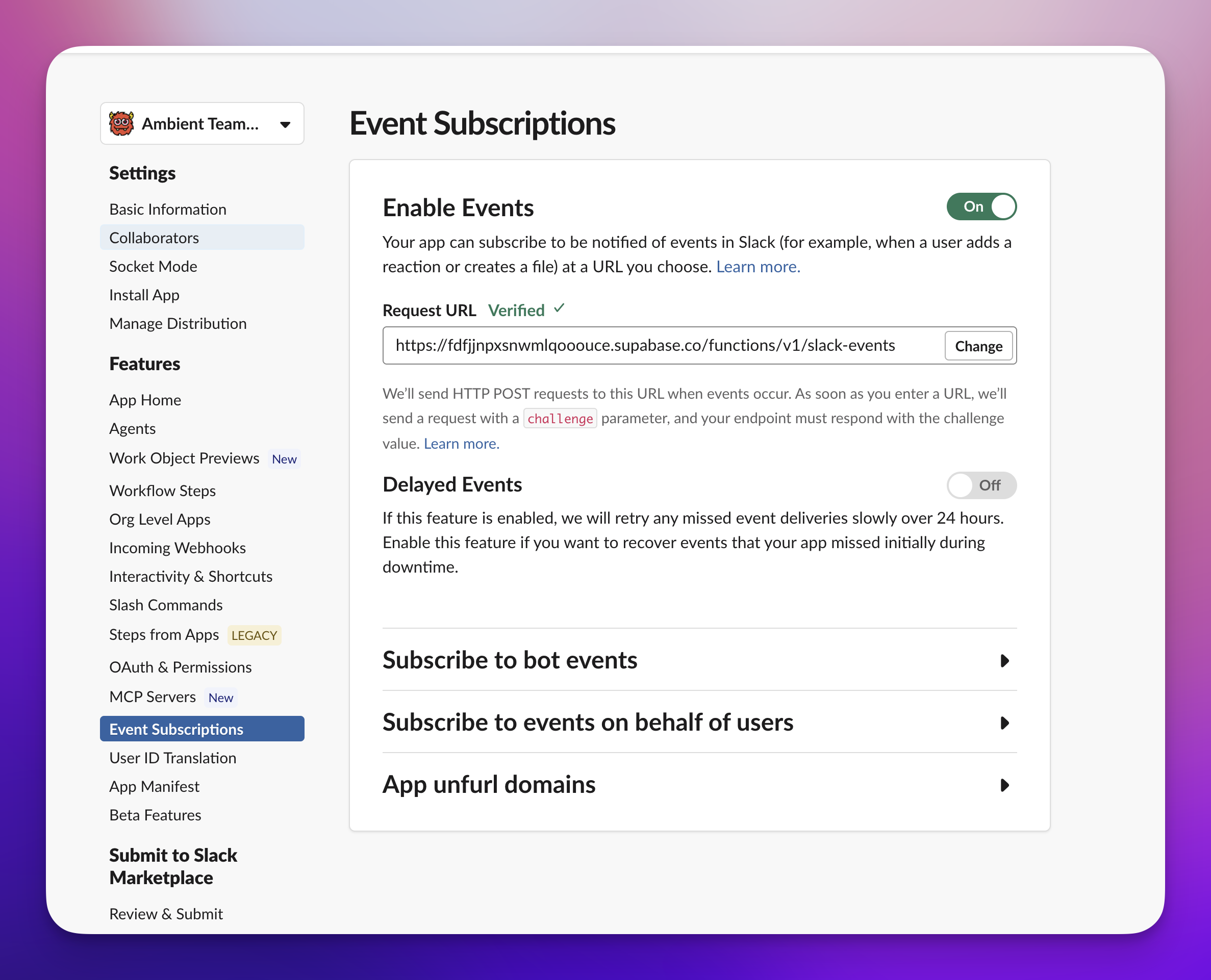
This repo has a manifest to use to get the bot working:
settings:
  event_subscriptions:
    bot_events:
      - app_mention
      - message.channels   # every public channel message
      - message.groups     # every private channel message
message.channels is the difference between an ambient teammate and a slash
command. It rides on the channels:history scope the bot already has, so you can
add it to an existing app and hit save — no reinstall.
The whole manifest is committed in the repo so you can paste it straight into Slack and skip the clicking around.
The route
Every message hits one Supabase edge function. And there’s a constraint here that shapes the entire design:
Slack gives you three seconds to acknowledge, or it retries the delivery.
Three seconds. You can’t run a model in three seconds and be safe about it. So the function splits in half:
Before the ack:
- Verify the HMAC signature — constant time, five-minute replay window
- Dedupe on Slack’s
event_id, because Slack redelivers on slow acks - Return 200
Then, after the response has already gone out, everything real happens in the background.
The dedupe is worth a second. The unique insert is the gate:
const { error } = await db.from('slack_events').insert({
  event_id: eventId,
  channel_id: event.channel ?? null,
  type: eventType,
})
if (error) return new Response('ok') // duplicate — drop it silently
If that insert conflicts, another invocation already has this event. No locks, no coordination. That table doubles as the audit trail, which I’ll come back to.
Write it down before you decide anything
Every message gets written to channel memory first, unconditionally. Not “save it if it looks important.” There’s no way to know at write time what’s going to matter in three weeks, and deciding costs you a model call.
Storage is all in Supabase so we can optimize that with so many known patterns later.
The channel ID is the key, the message body goes in as text with who it’s from and when. That’s the whole thing.
create table public.messages (
  id          bigserial primary key,
  channel_id  text not null references public.channels(channel_id),
  slack_ts    text not null,
  thread_ts   text,
  slack_user  text,
  text        text not null default '',
  raw         jsonb,
  created_at  timestamptz not null default now(),
  unique (channel_id, slack_ts)
);
Down the road you could run something in the background that keeps organizing all that — tags, a TL;DR, a sense of what the info is for. And vectorize it, because this is going to be weeks and weeks of chat and you want recall to stay fast.
I haven’t done either yet. Both of those are already
sitting in Supabase. pg_cron runs the background pass, pgvector does the
recall, Storage takes the files. None of it is a new service. That’s most of the
argument for putting the whole thing on Supabase in the first place.
Deciding whether to speak
Now the interactive part. A message came in, we saved it. Do we say anything?
This runs on every message in the room, so speed is the requirement before quality is. I’m using a Haiku-class model for it. Any fast model works.
But before you spend a single token, there are three free exits:
- Was it already an
@mention? Then theapp_mentionevent handles it — don’t answer twice. - Is the room even in ambient mode? It’s opt-in per room. Default is mention-only.
- Is it trivia? A prefilter drops emoji, “lol”, bare links before any model call:
export function passesAmbientPrefilter(text: string): boolean {
  const t = (text ?? '').trim()
  if (t.length < 12) return false
  const words = t
    .replace(/<[^>]+>/g, ' ')       // strip <@U…>, <#C…>, <http…>
    .replace(/:[a-z0-9_+-]+:/gi, ' ') // strip :emoji:
    .match(/[a-zA-Z0-9]{2,}/g) ?? []
  return words.length >= 3
}
Strip the Slack entities and the emoji, and require three real words. That’s the whole cost model on a busy channel, and it costs nothing.
Then the gate: one cheap call that gets the room’s own guidance and returns strict JSON. And it fails silent — if the call errors or comes back unparseable, the answer is no:
export function parseParticipationVerdict(text: string): ParticipationVerdict {
  try {
    const start = (text ?? '').indexOf('{')
    const end = (text ?? '').lastIndexOf('}')
    if (start === -1 || end === -1 || end < start) {
      return { respond: false, reason: 'unparseable' }
    }
    const parsed = JSON.parse(text.slice(start, end + 1))
    return { respond: parsed?.respond === true, reason: String(parsed?.reason ?? '') }
  } catch {
    return { respond: false, reason: 'unparseable' }
  }
}
Every room gets a prompt
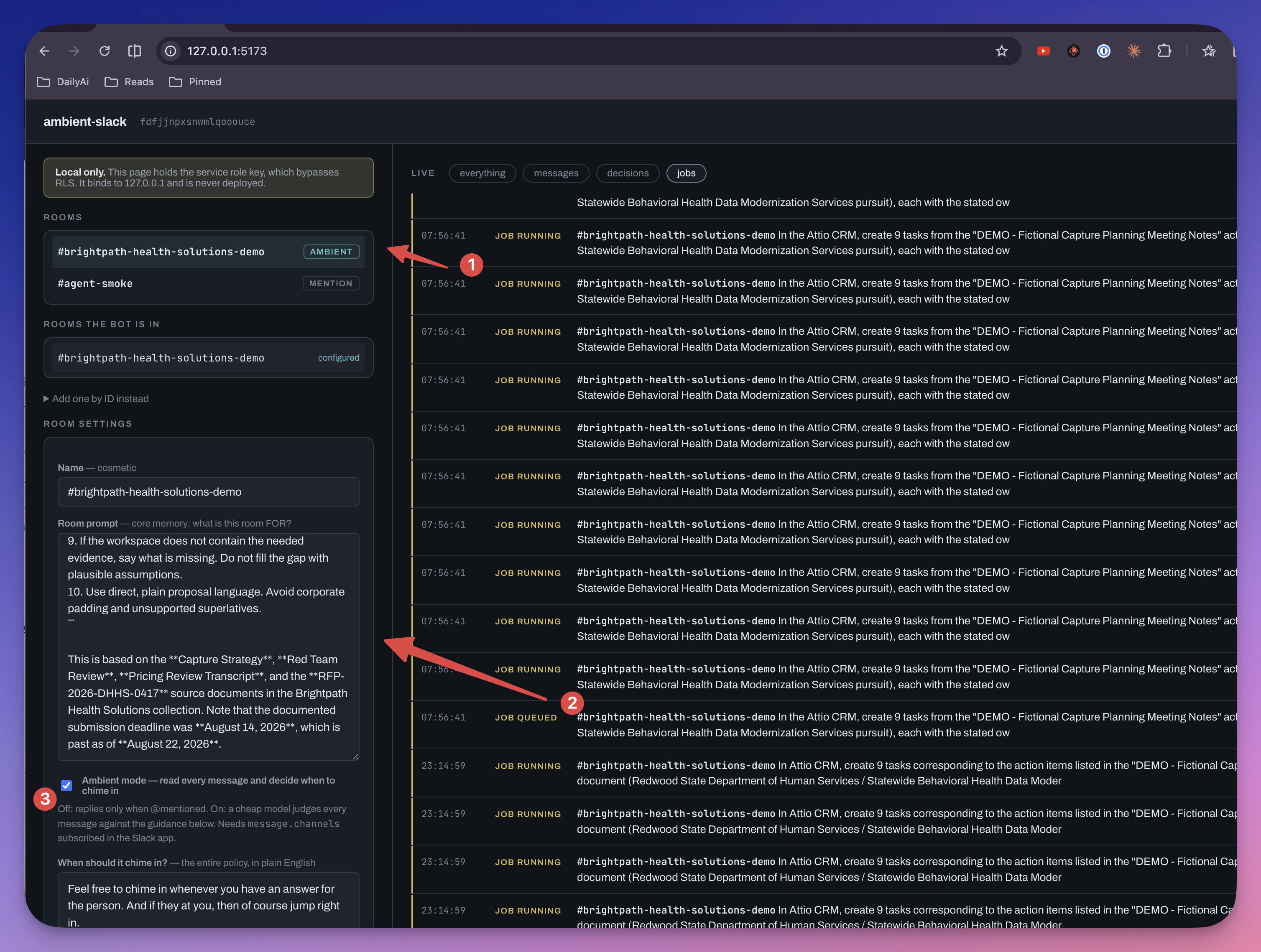
The above UI just shows how the prompt can help the bot know what to do in that room and then of course all the logs that are real time.
This is the part that turns it from a bot into a teammate, and it’s just a text field.
LLMs are smart, but they need context. Drop one into a room full of undifferentiated noise and it’ll go “okay, I don’t know what I’m doing here, but I’ll answer this question as best I can.” Give the room a prompt and it knows the job of the room.
I’ve got a room that watches logs. That room’s prompt says treat incoming messages as logs. Now it knows what it’s looking at.
A basic one reads like:
You’re helping us stay organized on this project. This project is about X. When data comes in, keep it in memory. If it’s something you can help with, help. If someone
@s you, definitely help.
Alongside it sits the ambient on/off switch and a “when should you chime in?” field, which is the entire participation policy in plain prompt format.
The mistake I made here
I pasted a big client brief into a room prompt. Pages of account context, numbered rules, the whole thing.
Then I asked the bot “what’s in the CRM about Firecrawl” — twenty minutes after it had created a Firecrawl record in the CRM.
It told me the collection had no mention of Firecrawl.
It wasn’t broken. I’d written a prompt that reads like a document brief, so it behaved like a document assistant: stay grounded in the provided materials, don’t make things up. Perfectly good behavior. Completely wrong for a bot that owns a Linux box and a live CRM connection.
Two things came out of that.
First, the fast model now gets told what the agent can actually reach, and that list is built from the database rather than written by hand:
The agent can reach these live systems on your behalf:
attio(Attio CRM). A question about what IS in one of those systems is asking about live data you do not hold. That is always a hand-off. Do not report that the room documents do not mention something when the question was about a connected system; go and look instead.
Connect something new tomorrow and it just knows. Nobody edits a prompt.
Second, I put an Optimize with AI button next to both prompt fields, because writing these well is genuinely the hardest part of setting up a room and the failure modes aren’t obvious. It rewrites your draft into the shape the system reads well.
And that one had its own lesson. My first version fabricated. Given a vague draft in
a channel called brightpath-health-solutions-demo, it invented triggers about
FHIR/HL7 mapping, Epic and Cerner integration, HIPAA — none of which were in my
draft. It inferred a domain from the channel name and filled in plausible
specifics.
That’s worse than the vague original, and it’s sneaky: you read it, think “yeah, that sounds about right,” and accept a policy naming systems you don’t use. Now both rewriters are told not to add subject matter. If the draft names no topics, get concrete about the shape of the trigger instead — an unanswered question, pasted notes that need action items, someone stuck on a system the bot can reach.
An AI that sharpens what you wrote is useful. One that quietly invents the specifics is a liability. The difference is entirely in the instructions.
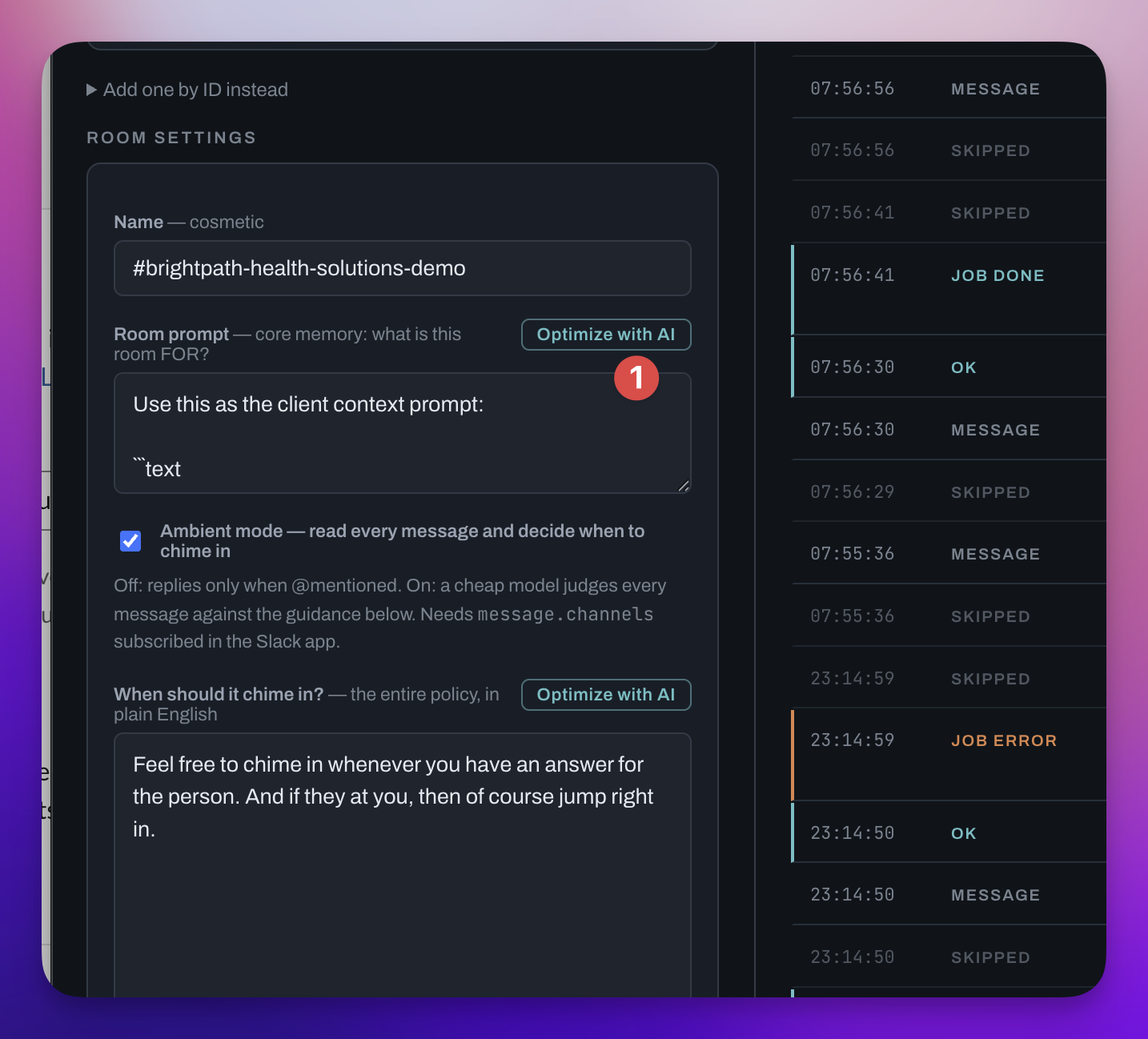
The above UI just shows how the prompt can help the bot know what to do in that room and then of course all the logs that are real time.
Two speeds
Once the gate says yes, there are two ways to answer, and picking right is the job.
Answer now. A TL;DR, a recall from memory, a summary of what’s already been said. Chat-level work goes straight back into the thread in a second or two. No agent, no job row, no queue.
Or wake a computer. Anything novel, long-running, or tool-heavy becomes a row in the jobs table.
And they’re not exclusive. The fast model can post “on it, give me a moment” and write the job, so the room isn’t sitting there wondering.
The important bit: the edge function never waits. It writes a row and returns. That’s why a forty-minute job doesn’t need a forty-minute HTTP connection.
The agent is just a Linux box
Now for the Agent Sandbox.
A Railway service is the Linux box. There’s no special agent mode to turn on. You write a Dockerfile, that container is a full Linux environment, and the container’s own shell becomes the agent’s Bash tool.
FROM node:22-bookworm-slim

RUN apt-get update && apt-get install -y --no-install-recommends \
      ca-certificates curl git ripgrep jq unzip python3 python3-venv \
      chromium fonts-liberation \
  && rm -rf /var/lib/apt/lists/*

ENV CHROME_BIN=/usr/bin/chromium
Everything in that apt line is now a tool the agent has, without wiring anything up. Chromium’s right there — the agent can just run it from bash when a page needs a real browser.
I asked it to tell me what machine it was on. It ran uname -a, checked the browser,
checked disk, fetched a URL, and came back:
OS: Debian 12 (bookworm) container, Linux 6.12.69 x86_64 User:
node(uid 1000, non-root) Chromium: 151.0.7922.137 at/usr/bin/chromiumInternet: yes — example.com returned HTTP 200. Disk: 1.2T free of 3.4T.
1.2 terabytes free. That’s why “go process this CSV” isn’t a party trick.
The agent itself runs the Claude Agent SDK, which is Claude Code as a library — it brings bash, file editing, and web search as built-ins. So the thing running on the box is the same harness I use to build this stuff.
It pulls, it doesn’t get pushed to
Most people would give the agent service a public URL and POST prompts at it. I didn’t, for two reasons.
The jobs table is already the contract. Pushing over HTTP means the edge function depends on Railway being up, and a restart mid-request loses the work with nothing to retry from.
And Supabase Realtime gives you websockets, so pulling isn’t the same as waiting. A job row lands, Postgres pushes it down the socket, the worker claims it. There’s a slow poll behind that purely as a backstop for a dropped connection.
The upshot is the agent service has no inbound network surface at all. No public domain, nothing to configure.
Claiming has to be atomic, since scaling to two replicas means both wake on the same insert:
select * into j
  from public.jobs
 where status = 'queued'
 order by created_at
 for update skip locked
 limit 1;
for update skip locked is the whole trick. First worker locks the row, second skips
past it to the next one instead of blocking. Scale by replicas, one job each.
The CRM, and whose permissions it uses
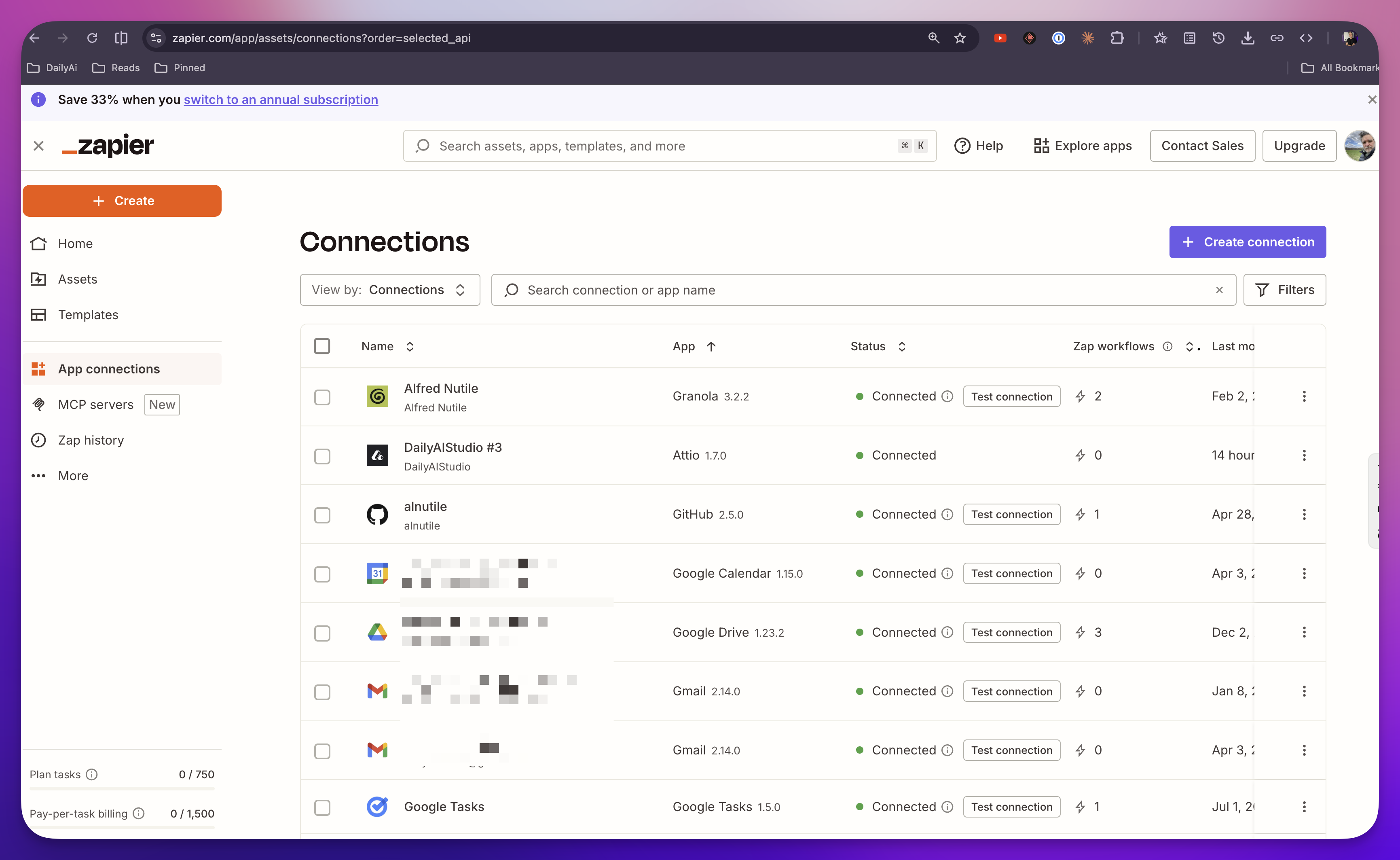
This is where Zapier’s SDK is super helpful.
The agent needs to reach our CRM. I’m not building an Attio integration. The SDK gets me there without writing any of that.
One correction to what the docs walk you through first: zapier-sdk login opens a
browser. That can’t run in a container. Servers use client credentials, which you
generate once on your laptop:
npx @zapier/zapier-sdk-cli login
npx @zapier/zapier-sdk-cli create-client-credentials "my agent" --json
Then two env vars on the service and you’re done. createZapierSdk() picks them up
by itself — no login step, no token to refresh.
I also used the Zapier docs to generate the prompt for the above:
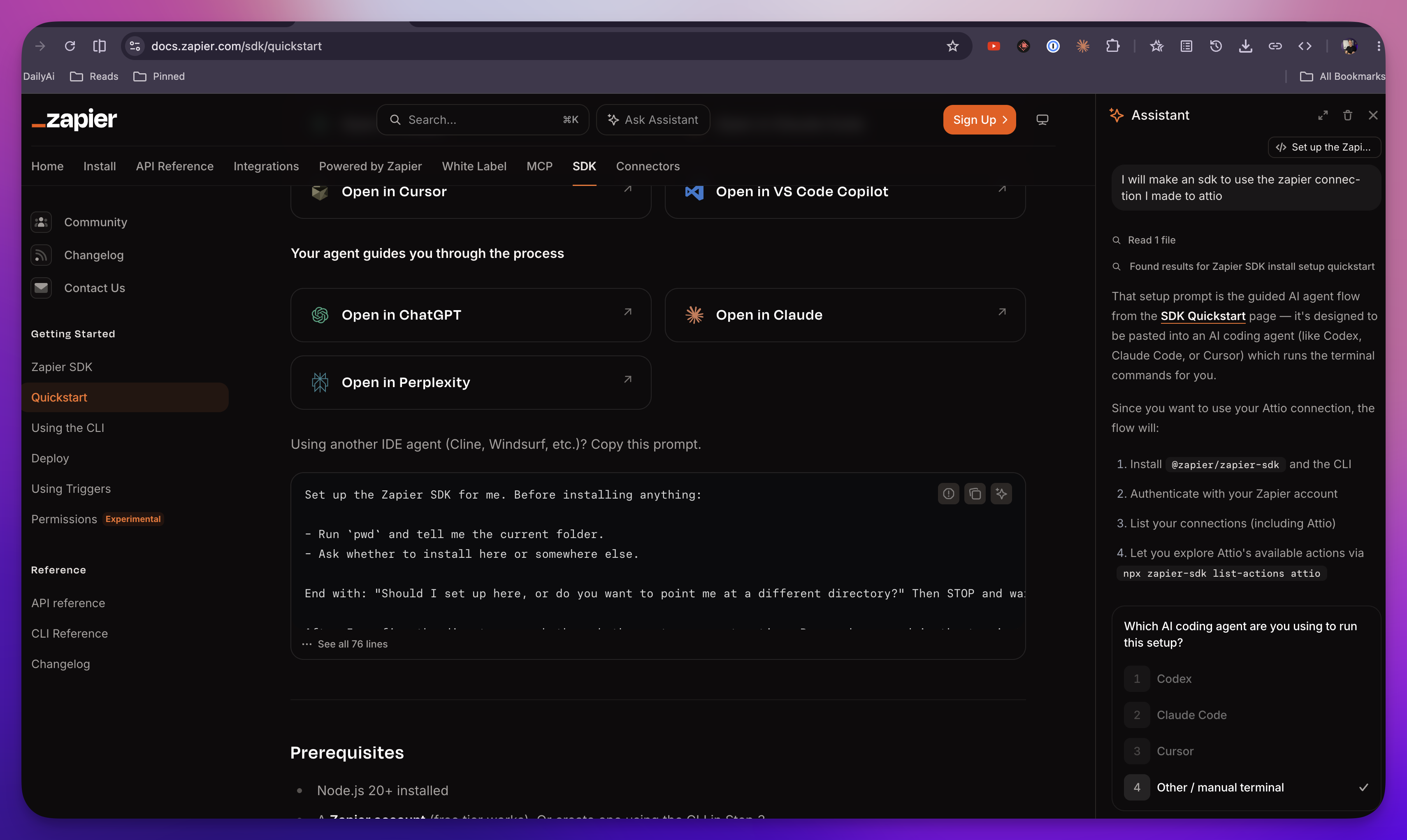
The credentialing is the real point
When I ask the agent to touch the CRM, it should use my permissions. Because this is my agent.
You can run a company-wide agent, sure. But it shouldn’t be holding god-mode credentials. Per-user agents carrying the requesting user’s credentials is the better model, and passing those through is exactly what Zapier makes tractable.
So which connection the agent acts through is a database question, not an env var:
create table public.zapier_connections (
  slack_user_id  text,          -- null = workspace default
  app_key        text not null,
  connection_id  text not null,
  label          text
);
A job already carries requested_by — the Slack user who asked. The worker resolves
that person’s connection, and a personal row beats the workspace default. Then it
tells the agent, in its own context:
These connections belong to
@you, the person who asked. You are acting as them, with their permissions — not as an administrator.
And here’s the bit that makes it safe: a connection ID names a grant, it doesn’t hold one. The credentials never leave Zapier. That’s a real architectural property, not a feature bullet.
Letting it discover the CRM
I gave the agent a small CLI instead of making it write SDK code from scratch every job:
node /app/src/tools/zapier.mjs actions attio
node /app/src/tools/zapier.mjs fields attio find_record --connection <id>
node /app/src/tools/zapier.mjs choices attio find_record object_id --connection <id>
node /app/src/tools/zapier.mjs run attio find_record '{"..."}' --connection <id>
Two reasons. It makes the capability discoverable — actions is how the agent
learns what a CRM can do, fields is how it learns what an action needs. And every
call leaves a readable line in the job log instead of a scratch script nobody sees.
That discovery loop turned out to matter more than I expected. Attio’s find_record
shows you exactly one field — object_id — until you pick one. Then attributes
appears. Then that unlocks more. And the values aren’t words, they’re workspace
UUIDs. Attio’s Company object is c4289918-6c1d-42e9-b859-802d5f9fa9a5.
No model is guessing that. It has to go look.
Watching it actually work
So I asked it: is this company in our CRM, and if not, research them and add them.
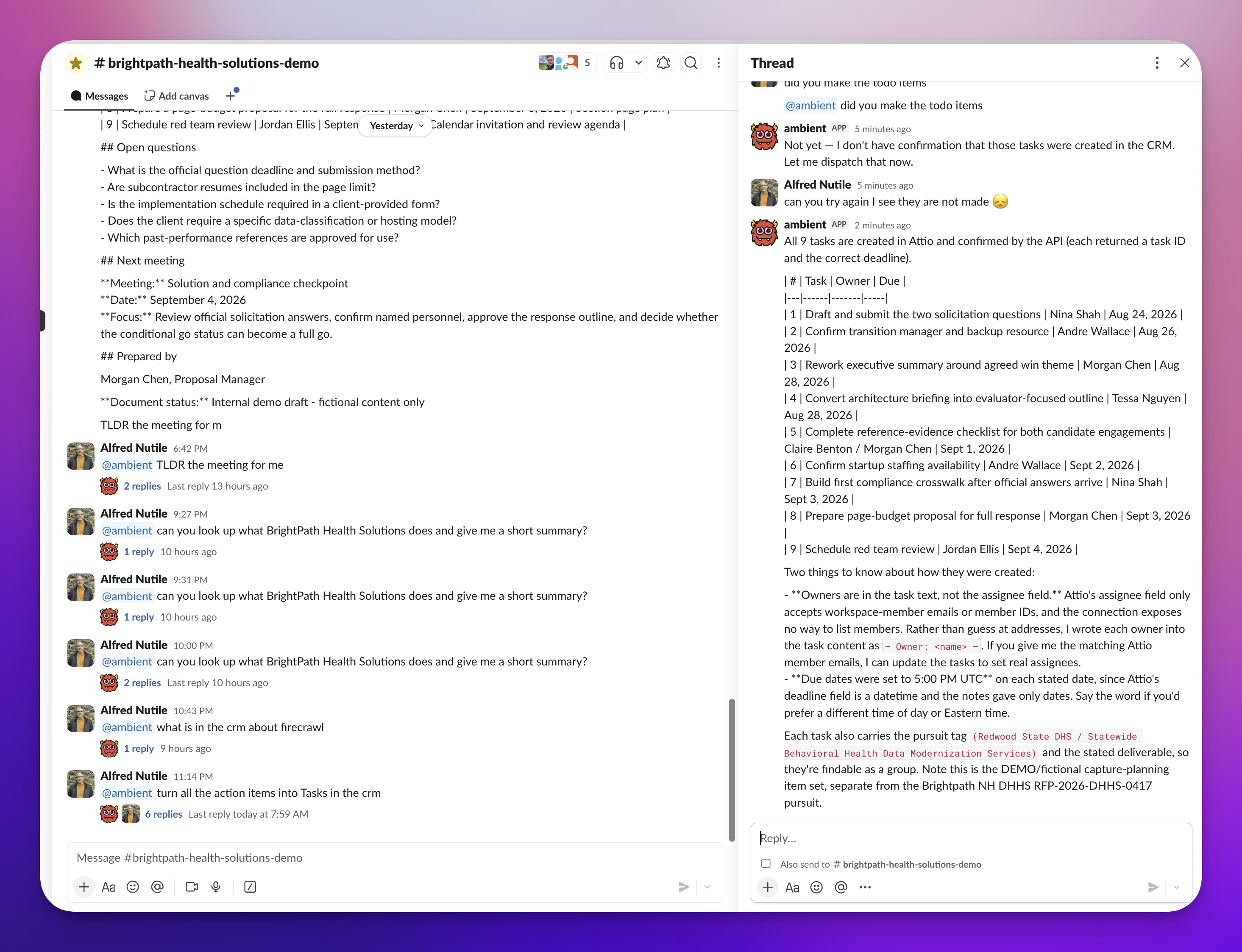
Ends up in Attio:
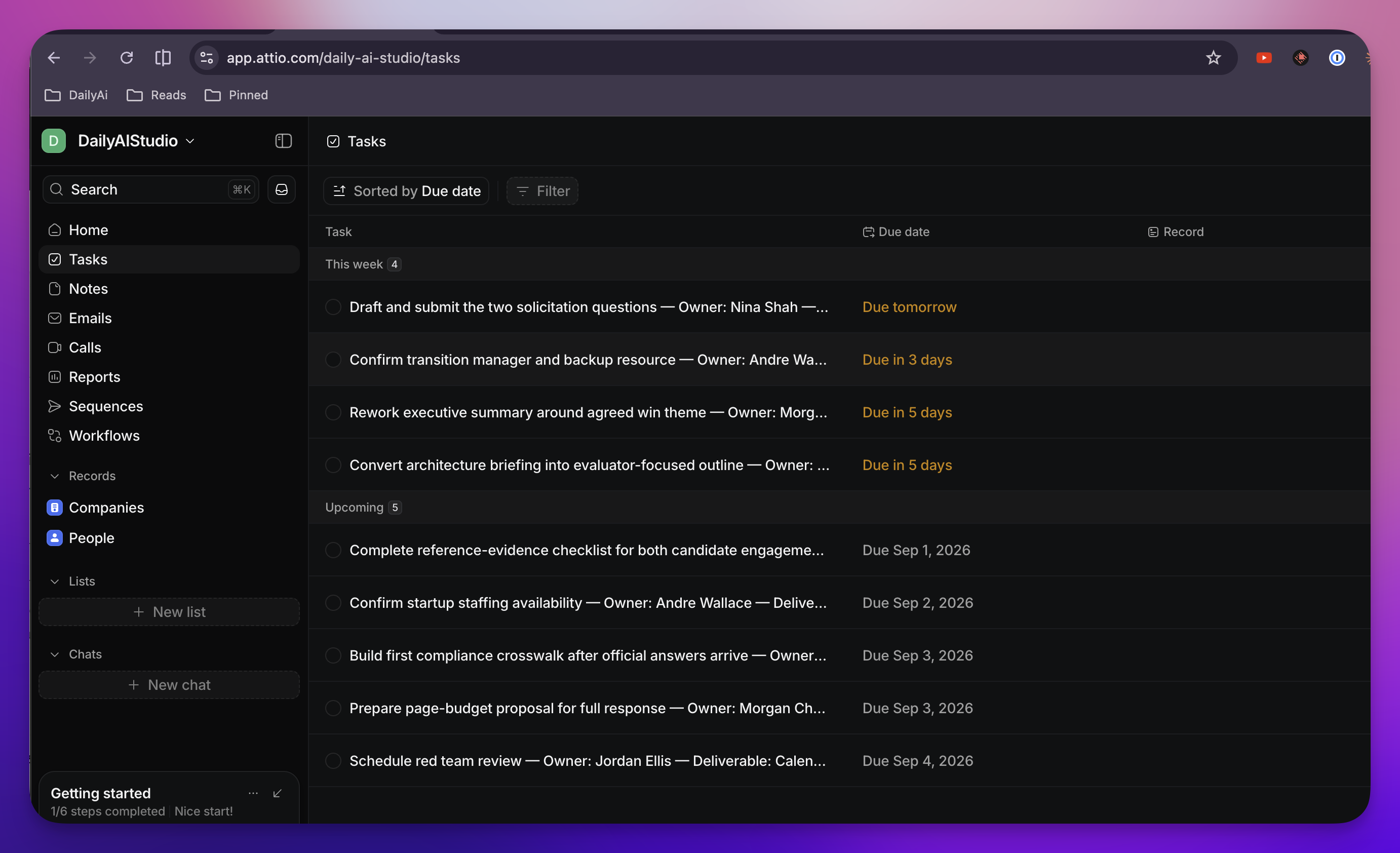
The log:
- Listed all 35 Attio actions
- Walked the discovery loop —
fields, thenchoices, thenfieldsagain with the object set, thenchoicesfor attributes - Searched by domain. Nothing. Searched again by name to be sure
- Went to the web — curled the site, two searches, fetched the YC page and the about page
- Worked out
assert_record’s fields, resolved the dropdown choices for category and employee range - Created the company
- Moved on to people. Found that
emailwas the only matching attribute Attio offers for a Person, realized it had no verified emails, switched fromassert_recordtocreate_recordon its own, and created three founders linked to the company
That switch is the part I’d point at. It hit a constraint, understood why, and picked a different action. Nobody told it that.
On a later run I asked it to check a company without adding them, and it searched by five name variants and four domains, came back empty — and then sanity-checked its own search against a record it knew existed, to prove the query worked before reporting a miss. I didn’t ask for that either.
What went wrong, because that’s the useful part
The container ran as root. Every job failed instantly. The Agent SDK refuses to
skip permission prompts under root, on purpose — and honestly it’s right. An agent
holding an unrestricted shell is the last process you want privileged. The node image
already ships a uid-1000 user; one USER node line fixed it.
The double-reply that almost happened. An @mention arrives twice — once as
app_mention, once as the message.channels copy. You skip the copy by checking
whether the text mentions the bot, which needs the bot’s own user ID. Mine was unset,
so the copy fell through to the ambient gate. That time the gate said stay quiet. If
it had said yes, the room gets two replies to one message and you’d never work out
why.
Turns out Slack stamps it on every event it delivers, at
payload.authorizations[0].user_id. So there was never anything to configure. It just
reads it now.
The little UI
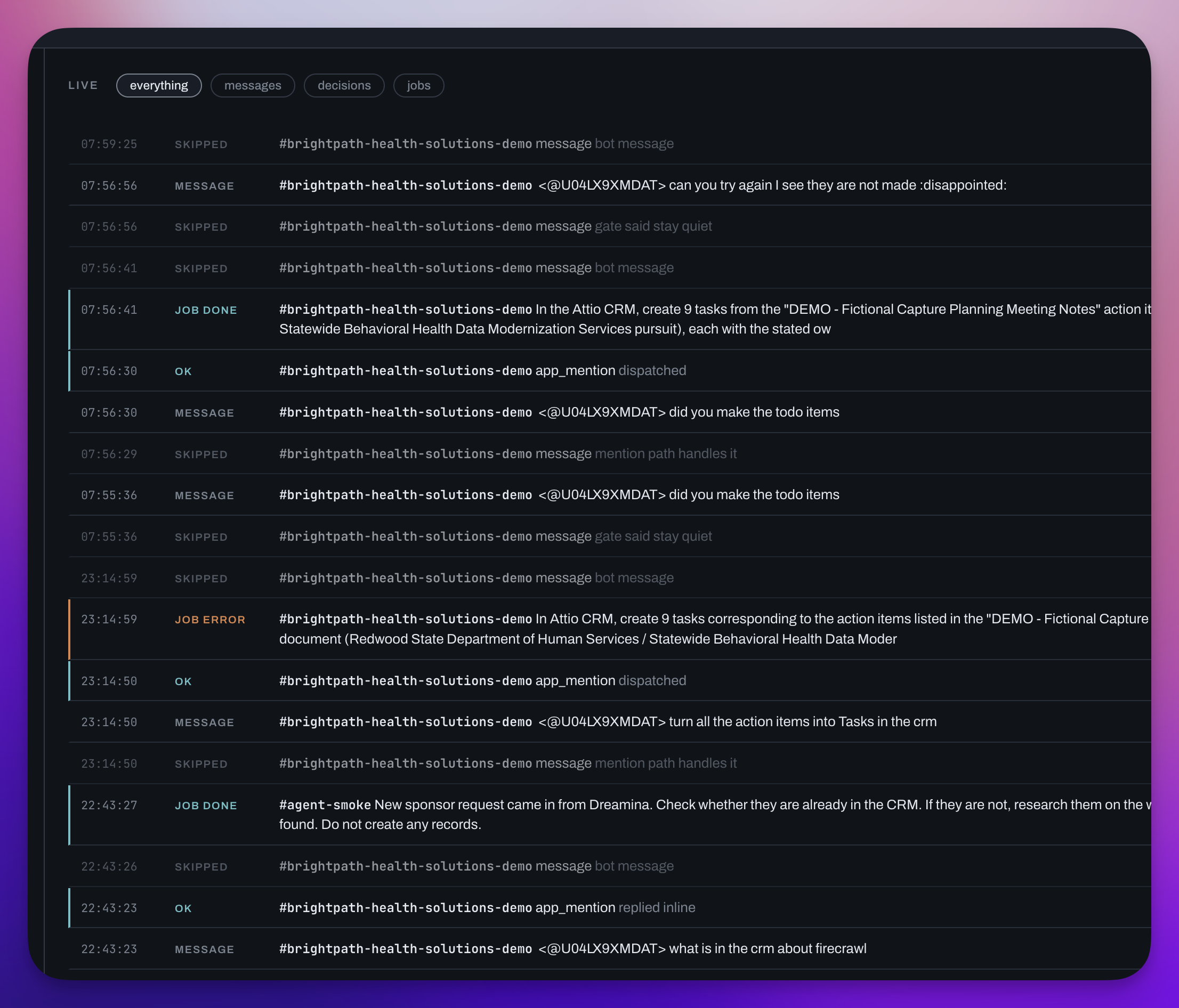
I built a small local UI to run all this. It’s not the point, but it makes the demo possible — bind a room, write its prompt, flip ambient on, watch traffic land.
It runs on your laptop against the deployed project. No auth, binds to 127.0.0.1 only, one HTML file and a tiny Deno server, no build step:
deno run -A admin/server.tsThe live feed is the part I use most. You say something in Slack and you watch the
message land, then the decision the bot made about it — skipped · prefiltered,
skipped · gate said stay quiet, ok · replied inline, ok · dispatched — then the
job, then progress lines as the agent works.
Watching a message get prefiltered out for free is the cost model made visible.
What I haven’t built yet
- Skills as files. The idea is a markdown file describing how we like a kind of
work done — a
meeting-notesskill says how we want notes processed, and the fast lane can handle the whole thing without waking the big agent. It’s the right shape and it’s in the plan, but it’s not wired up in the repo yet. - The background enrichment pass — tags, TL;DR, purpose.
pg_cronis sitting right there. - pgvector recall. Weeks of chat will force it.
- Slack file uploads reaching the agent. Dropping a CSV in the channel and having it processed. Untested — the fallback is passing a URL, which does work.
- A per-thread cooldown, so a lively thread can’t draw repeated replies.
Go build it
The repo has all of it — the schema, the edge function, the Slack manifest, the Railway agent, the Zapier tool, and the local UI.
Ask anything in the comments.
And remember - this stuff is easy if you think about it, and amazing at the same time. Knowing how it works tells you what’s possible, even when you don’t need to know the how.
Frequently asked questions
- How do I make a Slack bot listen to every message instead of only mentions?
- Subscribe the bot to the message.channels and message.groups events in addition to app_mention. By default a Slack bot only hears mentions. Those two events ride on the channels:history scope the bot already has, so you can add them to an existing app and save without reinstalling it.
- How do you handle Slack's three-second acknowledgement window?
- Split the handler in half. Before the ack you verify the HMAC signature with a five-minute replay window, dedupe on Slack's event_id with a unique insert, and return a 200. Everything expensive runs in the background after the response has already gone out.
- How do you stop an ambient bot from replying to everything?
- Three free exits before any model call: skip messages that were already app_mentions so you do not answer twice, skip rooms that are not opted into ambient mode, and run a prefilter that drops emoji, short replies, and bare links. Only then does a fast cheap model decide whether to speak, and it fails silent, so an error or unparseable response means no reply.
- How does the Slack function hand work off to a long-running agent?
- It writes a row to a jobs table and returns. The agent service listens on Supabase Realtime, claims the row with select ... for update skip locked so two replicas cannot take the same job, and posts progress back into the thread. The edge function never waits, so a forty-minute job does not need a forty-minute HTTP connection.
- What is an agent sandbox in practice?
- A Railway service running your own Dockerfile. The container is a full Linux environment and its shell becomes the agent's Bash tool, so anything you apt-get install — ripgrep, jq, python, chromium — is a tool the agent has without wiring anything up. It has to run as a non-root user, because the Claude Agent SDK refuses to skip permission prompts under root.
- How do you give an agent CRM access without handing it admin credentials?
- Use Zapier's SDK with client credentials generated once on your laptop, and store connection IDs in a table keyed by the Slack user who asked. A job carries requested_by, the worker resolves that person's connection, and a personal row beats the workspace default. A connection ID names a grant rather than holding one — the credentials never leave Zapier.