Agents: What They Are, Why You Need Them, and How They Work
Everyone's talking about agents. Here's what actually changed: instead of writing a pile of tools for a long-running process, we now hand the agent a whole computer and let it use Bash and the old Unix tools to get the job done. Two real examples, and a lot less magic than you'd think.

TLDR: Last year an “agent” was mostly a long-running Node or Python process: send an HTTP request, hand the JSON to an API, check whether it wanted to call one of the tools you wrote, run the tool, feed the result back, repeat. That works. But the new move is different. We hand the agent an actual computer, a sandbox, and it reaches for Bash and the old Unix tools to do whatever the moment needs. I’ll walk two real examples: an agent that reads a video of me playing pickleball and tells me about my form, and an agent that takes a zip full of data and crunches it, no RAG pipeline in sight.
We hear the word “agent” constantly. As someone who has worked Linux for 20+ years it is amazing to see that Agents are realy coming down to giving AI Bash!
Last year, an agent was basically a long-running process
Back in 2025 most of the work was writing tools for agents. The agent itself was, in a lot of ways, just a long-running Node process. We’d send an HTTP request, use JavaScript or Python to pass that JSON to the API of one of the services (OpenAI, Anthropic, plenty of others), and then look at what came back. Was it a tool call or not?
If it was, we’d reach for the tools we wrote: how to use HubSpot, how to hit the SERP API, whatever the job needed. Some of those tools were plain deterministic functions. Some had AI inside them too. The tool did its thing, handed the result back, and the agent took that result and decided the next step.
That works. I built a lot of it. But it’s a different animal from what we’re about to talk about.
Now we hand the agent a whole computer
The new move is to give the agent a computer. A sandbox. A place where it can just do its work. And once it has that computer, the thing it ends up reaching for is Bash.
TLDR on Bash: Bash is the command line. The name stands for “Bourne Again SHell,” a play on the older Bourne shell it replaced. Brian Fox wrote it for the GNU Project and it shipped back in 1989, so it’s been around for more than thirty five years. It’s the default shell on most Linux servers, and it was the default on the Mac for years too. Its whole job is to take the small commands you type, run programs, and glue little tools together. That’s the thing our agents are now picking up and using.
Bash is part of that whole Unix and Linux mentality: a pile of small, focused tools that each do one thing well. Some of them have the strangest names you’ll ever see. Here’s a short list of the ones that keep showing up:
- grep: search text. Give it a pattern and some input and it prints the lines that match. The name comes from an old editor command,
g/re/p(global / regular expression / print). - sed: the “stream editor.” Find-and-replace and other edits across a stream of text, no opening a file in an editor.
- awk: a tiny language for pulling columns out of text. Point it at a delimited file and it grabs the fields you want, does math on them, reshapes the rows. It’s named after its three authors, Aho, Weinberger, and Kernighan. And yes,
awkis a great name. - find: walk a folder tree and list the files that match what you asked for, by name, size, type, or age.
- ffprobe and ffmpeg: the video and audio Swiss army knife.
ffprobereads a media file and tells you what’s inside it (length, resolution, codecs).ffmpegcuts it, converts it, compresses it, rips the audio or the frames out. I lean on these in the first example.
Then there’s the idea that ties them together: piping. You take the output of one tool and pipe it straight into the next one with a |. Tool one does its one job and hands its result to tool two. Simple, and kind of amazing.
NOTE: none of this is new. These tools have been around for decades. What’s new is that AI can now pick them up and string them together on its own, in the moment, for whatever you just asked.
So when we give AI Bash and everything underneath it, it can pretty much do whatever it needs to do right then. It doesn’t need me to pre-build a tool for cutting a video or reading a CSV. It just uses the tools that are already there.
The in-between: what “managed agents” saves you
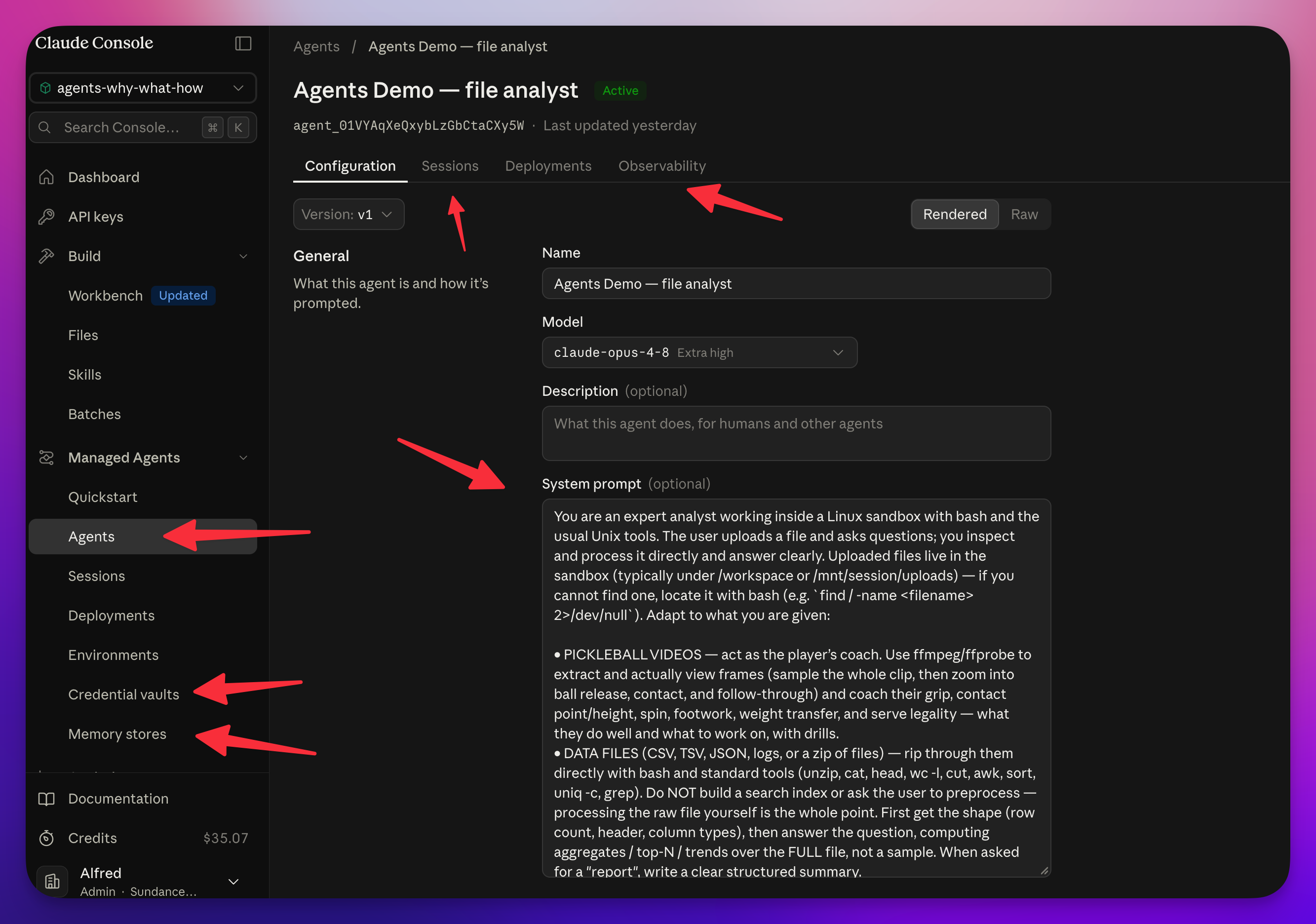
For these examples I’m using Claude’s managed agents. Not because it’s the only way, and not because I’m here to sell it. OpenAI has this. Plenty of others do too. Just Google it. I picked one so I didn’t have to build all the wiring in between, and that wiring is the part worth understanding.
So what’s “the in-between”? Here’s what a managed setup hands you so you don’t have to build it:
- Sessions. Each run of the agent is a session, and it keeps history, so you can go back and see what happened.
- A dashboard and observability. You can watch the agent live: what step it’s on, what tool it’s using, whether it’s going a route that makes sense. You need this less and less as the models get smart enough to trust, but when you’re tuning a prompt it’s gold.
- Shared memory. Agents can build up a memory, so when one wakes up it knows what it did last time. It can share with other agents what it’s been working on, so they can fan out on the same job or learn from past runs. Some setups even have a “dreaming” step that optimizes that memory over time.
- Sub-agents. One agent can spin up others, and the shared memory keeps them in step.
- Environment secrets. These are the API tokens you want to give the agent without hard-coding them into the request. It grabs them from a vault when it needs to reach an API you told it it could use. I go deeper on secrets in the vibe coding post.
- Connectors, MCPs, and your own tools. You can still bolt on the official connectors (Google Drive, Gmail, HubSpot) or write your own MCP and tools for the moments it needs them. You just don’t lean on them as hard, because a lot of what used to need a custom tool now happens with plain Linux tools.
- Batches for large processing, a files area for the stuff it works on, and a skills area you can share across agents.
If you tried to build all of that yourself, it’s not impossible, it’s just a lot of little details and a lot of unknown unknowns. And the nice part is you can deploy this to your own servers, so it’s not all-or-nothing.
Alright, enough setup. Let me show you two things that would have been a real pain to build last year.
Example 1: hand it a video, ask about my pickleball form
The goal here is simple. I upload a video of myself playing pickleball and the agent processes it to tell me something about my form and my serve. Last year I’d have had to reach for something like n8n, or write code, or have AI write the code and then figure out how to deploy it and string it all together.
Here I just say: take this file, go.
Behind the basic little upload UI (and it is basic, it’s only there to prove the point), when I send the file it goes over to the managed agent. Somewhere in the setup is a system prompt that says, in effect, “this is a pickleball video, do what the person is asking with it.”
NOTE: I don’t like putting the prompt in code, because I want to update the prompt without a deploy. Keep the prompt somewhere you can edit it.
Then the agent gets its computer and goes to work. If you watch the session live, you see it running Bash: making a directory, running ffprobe, reading and cutting the file. These older commands, now driving some genuinely modern work on video.
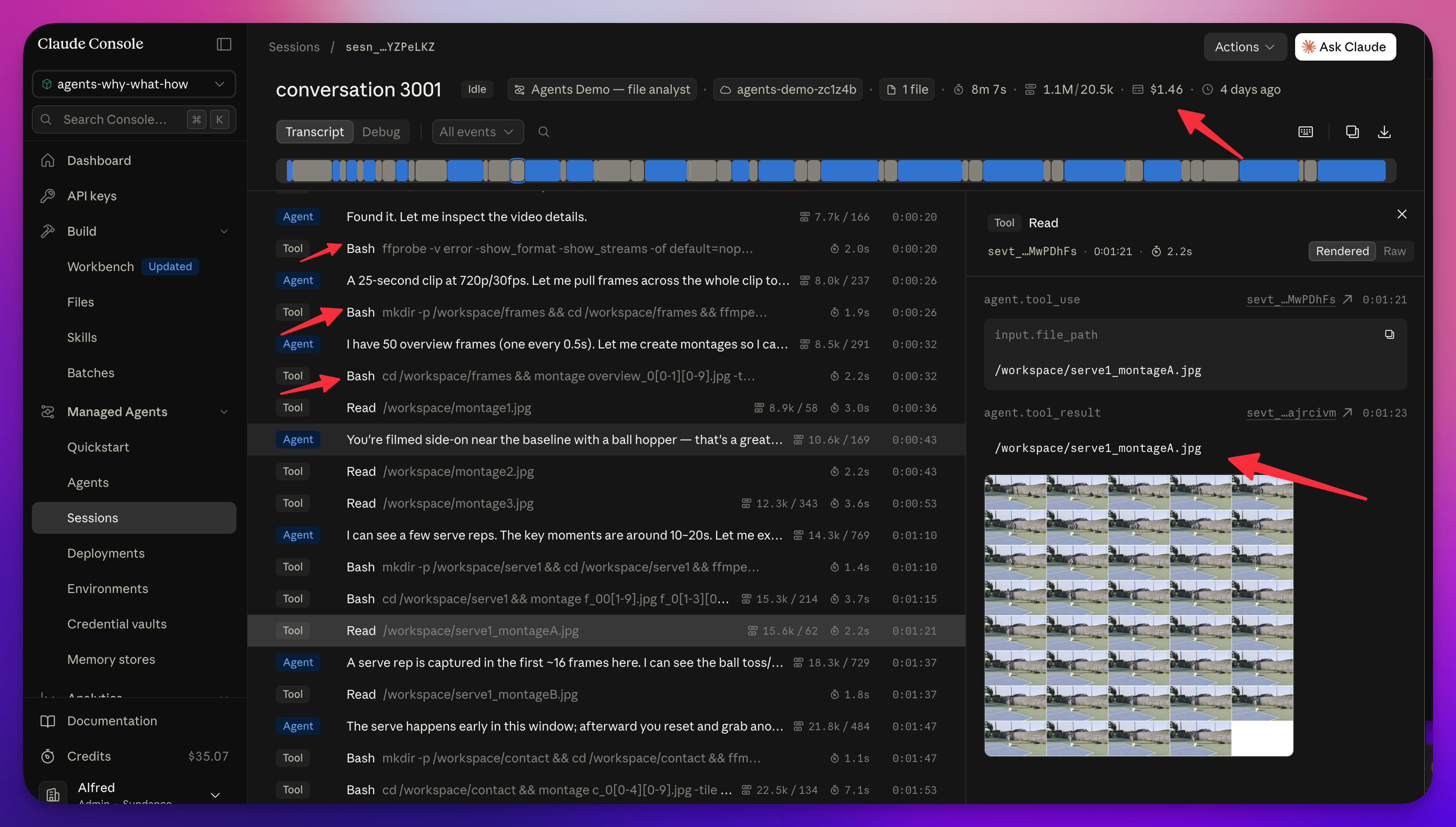
A couple of real things happened while I recorded this, because I don’t do live demos. One session had a stale answer sitting in memory, so I re-uploaded and kicked it again, and it was smart enough to notice it had already seen the same video. The memory store also started saving notes about me as a player, which is exactly what you’d want if this were a real coaching tool.
NOTE: if this were multi-user, you’d have to parse that memory out per user. Worth thinking about early.
Example 2: hand it a zip full of data, no RAG pipeline
Second demo. I upload a zip file. I don’t even uncompress it first.
Here’s the thing about that: give AI a zip and it just uses Bash to open it, or a tool inside Bash. It doesn’t care. Last year a big data file meant putting it in S3 or Supabase, triggering an event to break the file up, triggering another event to process each chunk, and making sure step one finished before step two started so nothing timed out. That’s a lot of plumbing just to string it together.
This time I handed it to the agent and let it go.
NOTE: my little chat UI was a bit off and didn’t wait for the file at first. That was one prompt to fix, and then the agent had the file and full access to it.
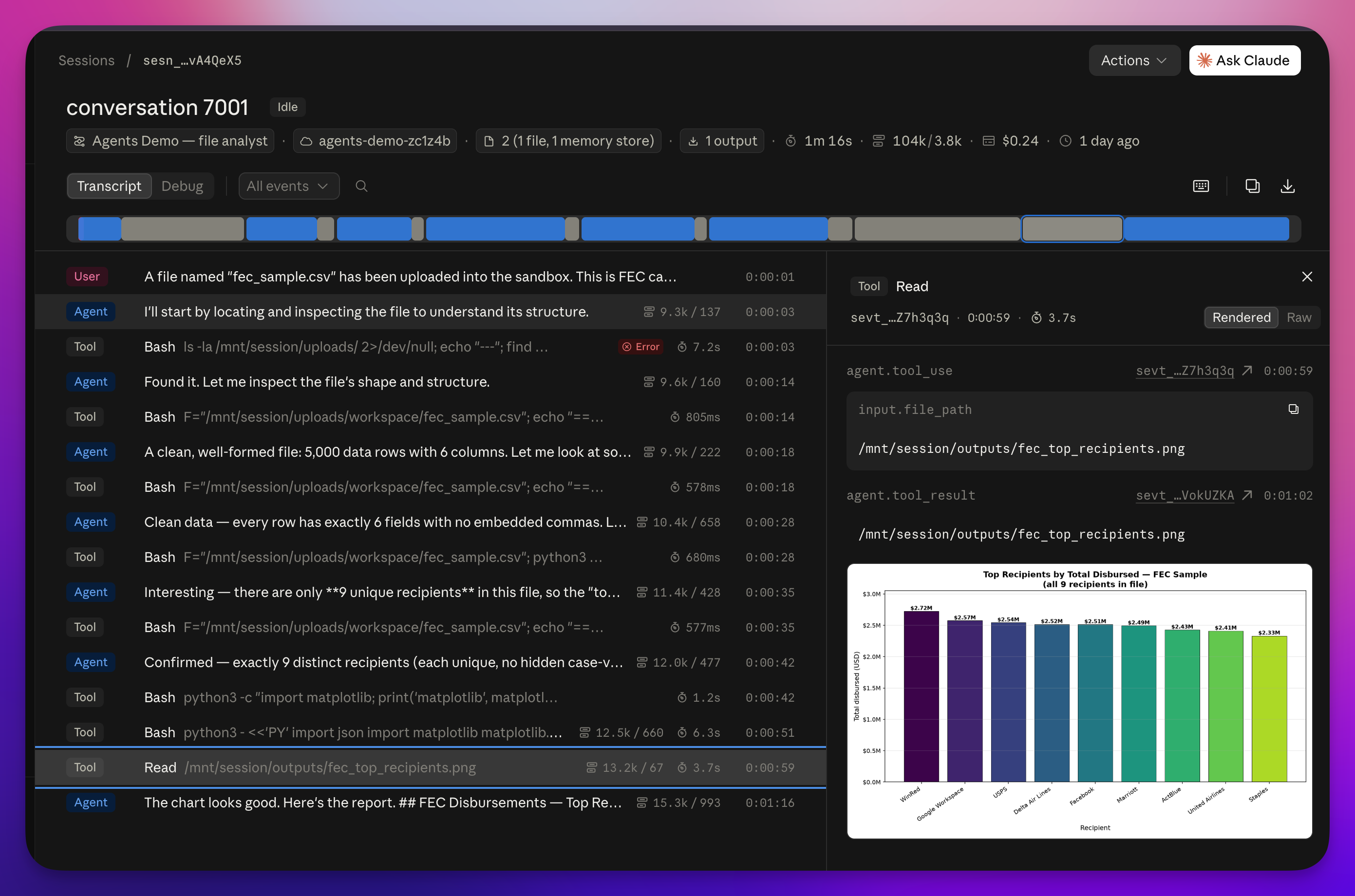
Watch what it does. The tool is Bash, and it uses find to locate the file, echoes the result, and shoots the noise into /dev/null so it isn’t drowning in output. Then it mounts the session that has the file, lists it, counts the lines, and reads the header. All the stuff I used to hand-code.
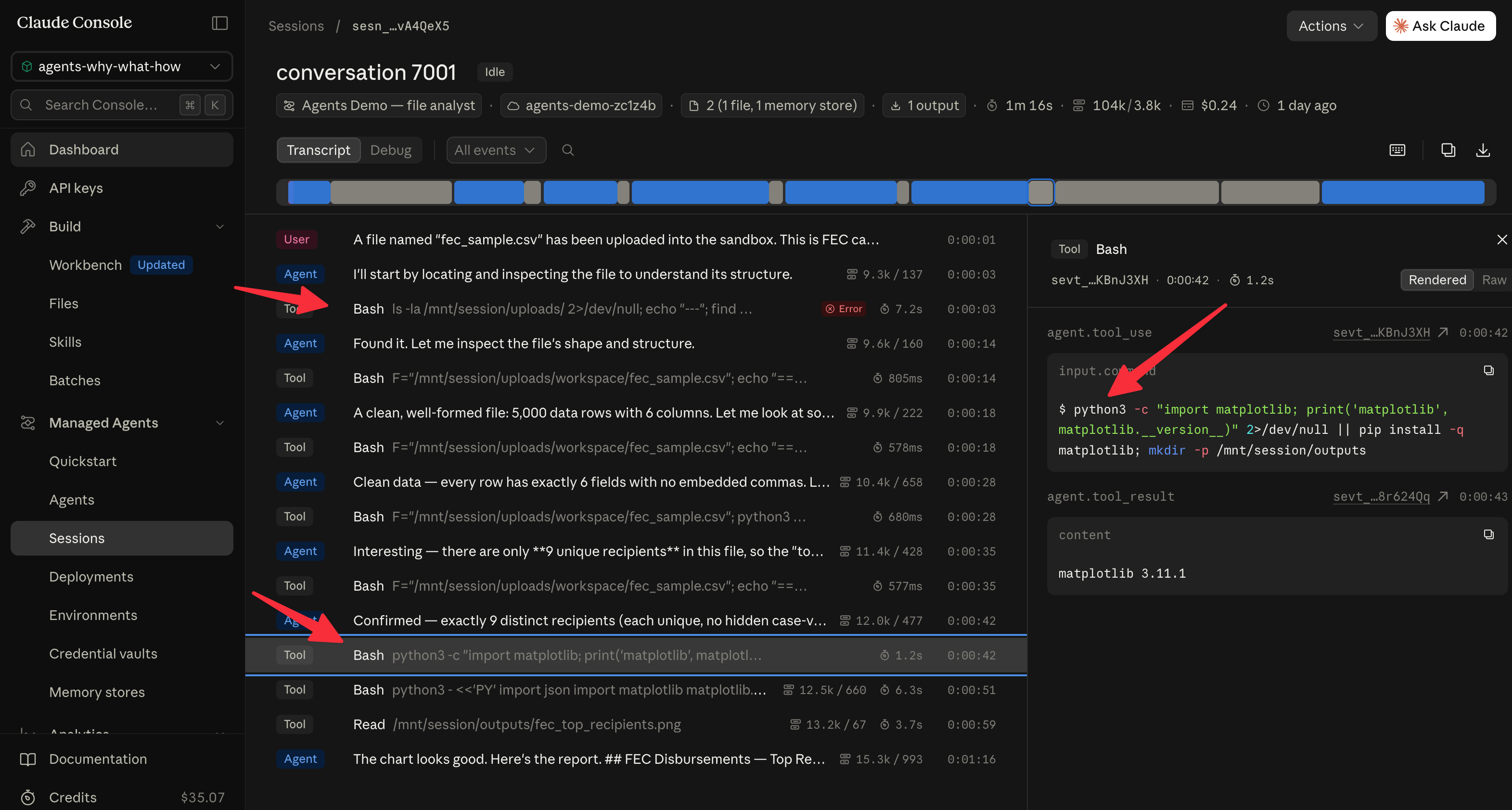
Then it decides it wants Python, sets a variable for the file path, and writes a Python command to parse the data. Now you’ve got a computer that has Python, which is the right thing for this, and it just uses it. It comes back with a clean, well-formed file of about 5000 rows, confirms the column it cares about, checks its own count (“there are exactly nine unique recipients”), and keeps going. It’s building these little tools on the fly.
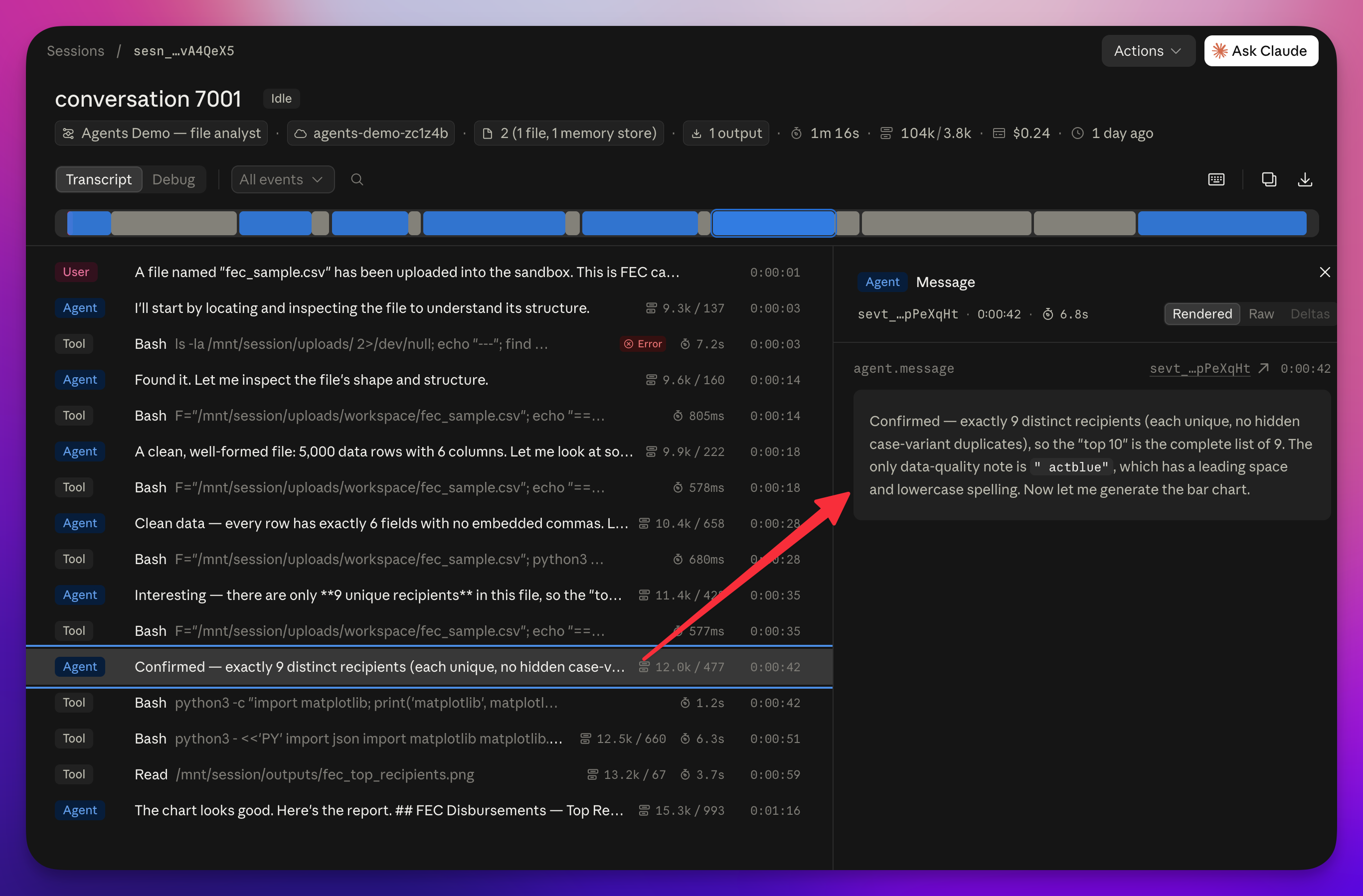
For the record, this was Federal Election Commission contribution data. The agent pulled the top contributors straight out of the file, names you’d recognize. So you could take almost any file type, hand it over, and get a real answer back. Now picture that feeding your chat UI, or getting posted somewhere your users can see it.
It’s non-deterministic. You can still trust it.
Here’s the catch. This is a non-deterministic path. Run it twenty times and it might not go the same way every time. So how do you trust it?
You use evaluations. You lock down the prompt, the context, the tools, and the model, then you test that combination across enough real examples that you know how consistently it holds up. That gives you a read on two things at once: consistency and cost. You can find the cheapest model that still nails it. I wrote a whole piece on this: Evals: stop guessing whether your AI works.
That’s the difference between a demo that works once and something you’d actually put in front of people.
The takeaway
Pull back and look at what happened. In 2025 we wrote the tools: search the web, grab this file, chunk this data, parse it. Now the agent just does it, on a computer of its own, with tools that have been sitting in Linux for decades.
You can still make it pretty deterministic with the right prompt, the right structure, and well-tested, focused sub-agents. And you can vibe code a lot of the surface around it. Where it gets tricky is the wiring: events, timing, race conditions, waiting for one thing to finish before the next kicks off. That’s the part managed agents hand you.
So that’s the game now. You’re basically running a computer with AI at the controls. It can use everything native to Linux, build quick tools in Python, research the web, and get the job done. I hope that pulls some of the mystery out of it while leaving the good part intact: a lot of the time you can just point it at the task and let it work.
The repo is linked below if you want to poke at it, but the code matters less than the shift itself. Go try it. https://github.com/alnutile/agents-what-why-when
Frequently asked questions
- What is an AI agent in this newer sense?
- An agent used to be a long-running process that called tools you wrote by hand. In the newer sense, the agent is given an actual computer or sandbox where it can run commands itself, mostly through Bash, to do the work. You hand it a task and it figures out the steps on its own machine.
- Why do agents use Bash and old Linux tools?
- Once an agent has a computer, the fastest way to get real work done is the pile of small, focused Unix tools already installed on it, like grep, sed, awk, find, and ffprobe, plus Python. It glues them together with pipes instead of needing a custom tool written for every single job.
- What does a managed agent service give me that I would otherwise build myself?
- Sessions with history, a dashboard to watch runs live, shared memory across runs, sub-agents, a vault for secrets, connectors and MCP support, and batch processing. The genuinely hard part it handles is the wiring: events, timing, and race conditions between steps.
- Can you trust a non-deterministic agent?
- Not blindly. You use evaluations. You lock down the prompt, tools, context, and model, then test that combination across enough real examples to measure how consistent it is and what it costs. Then you pick the cheapest model that still passes.
- Do I need a RAG pipeline to process files with an agent?
- Often no. You can hand the agent a zip file or a large CSV and it will use Bash to open it and Python to parse it, with no separate ingestion or RAG pipeline for the simple cases. For a lot of file work the old command-line tools are enough.
- Where does the agent actually run, on my computer or in the cloud?
- In the cloud, on the managed service's sandbox, separate from wherever you host your website. Your site can call out to the agent through the web, a chat request, or a scheduled job, and the heavy work happens on that remote computer, not on yours.