Ai Tools and N8N
One of the biggest wins for us as Builders is Ai Agents and Tools
You can see the video here
Tool Use Is the Real Superpower of AI Agents (And Most People Are Missing It)
This is a big deal for founders, solo devs, and anyone shifting into AI-first product building.
Everyone’s talking about AI prompts or the latest LLM release, but what most people are missing is this:
🔑 Tool usage is the actual superpower of AI agents.
Why This Matters
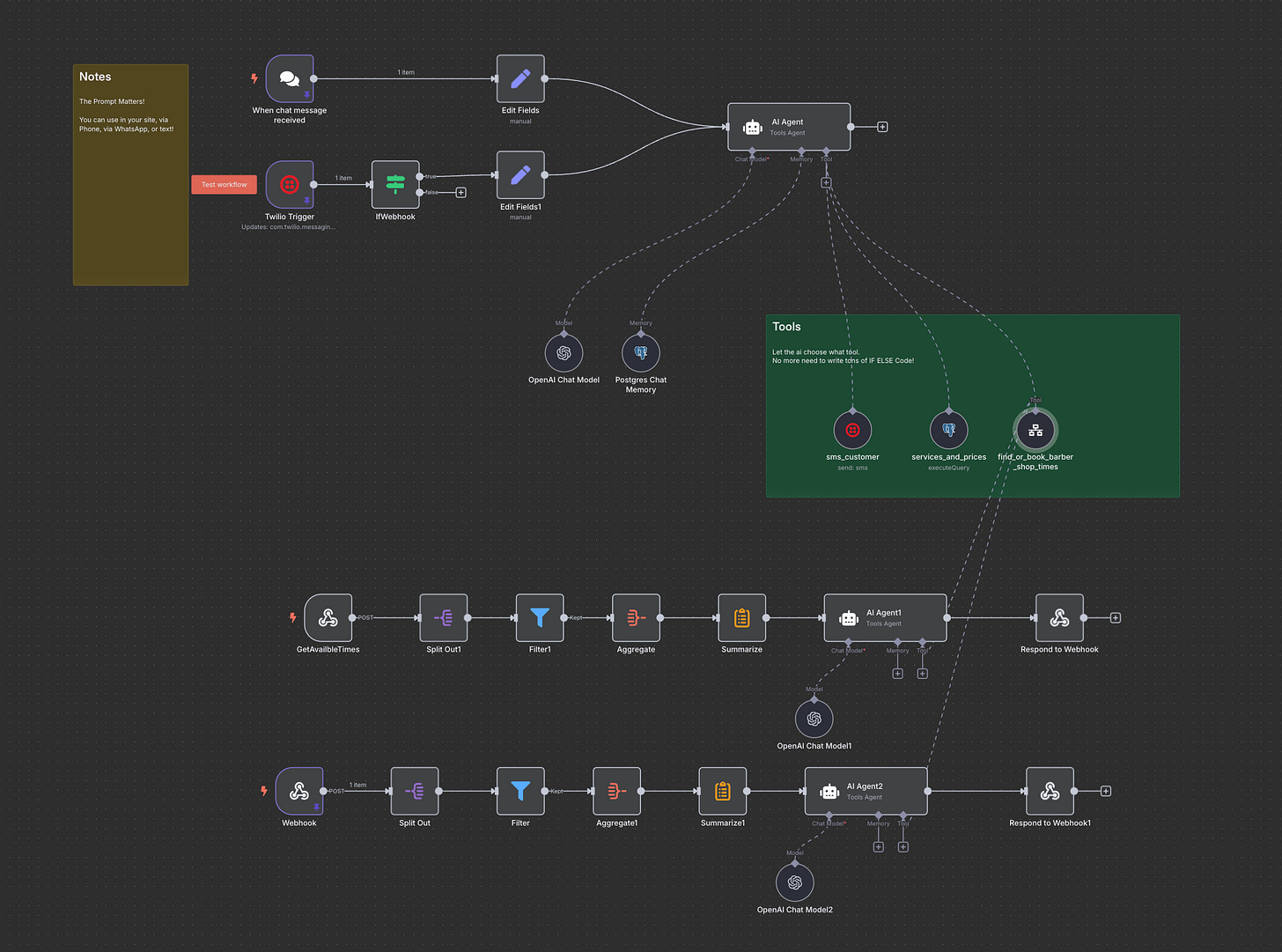
You can send a single customer request—via chat, API, phone call, or text message—to one place (an AI agent), and that agent can intelligently decide what to do next.
Let’s say you run a barbershop. Customers might ask:
What appointments are available?
Can they book one?
What haircut styles do you offer?
How much do they cost?
That’s a mix of questions. Normally, you’d hard-code logic for each with if...else statements, backend controllers, or some webhook spaghetti.
But now?
You let an AI agent decide which tool to use—and it just handles it.
What I’m Building With You
In this post and the video that goes with it, I’ll walk you through building an AI-powered, tool-driven customer interaction system using n8n, LLMs, and simple APIs.
The twist? The magic isn’t in the tools themselves.
It’s how the agent is allowed to use them, freely and smartly, based on user intent.
The agent doesn’t need you to code every possible case. It just needs tools and a clear prompt.
Here’s What You’ll See (Live in the Video):
A chat where we interact directly with the agent
A real website using the same agent in production
API calls from Postman (showing how devs can test it)
SMS interactions with the exact same backend logic 📷 [IMAGE: Diagram of inputs: SMS, API, Webchat → Agent → Tools]
Agents Don’t Follow Rules, They Make Decisions
This is key:
There are no if...else blocks. Just routing based on natural language.
The agent can:
Choose the right tool (e.g., Google Calendar, Supabase DB, pricing API)
Ask follow-up questions (if needed)
Respond smartly across platforms
Want it to book appointments? Search services in your DB? Send a confirmation email or SMS?
It’s all possible—and you don’t need to hardcode every flow.
Tool Wrangling: When to Be Smart About It
Sometimes, speed matters. If you’re on a phone call, you don’t want to daisy-chain 6 tools. You want one optimized API that does the job fast.
Other times, flexibility wins. Your agent can:
Search a DB
Return available services
Ask for clarification (e.g., “Do you mean Mike or Matt?”)
Confirm the booking
And because each part is a tool, you can plug, swap, or upgrade them without rewriting the core logic.
[
What Is an Agent Really?
Let’s demystify this:
An agent is just an LLM + tools + a job to do.
It can be triggered:
By schedule (e.g. n8n cron)
By webhook
By a direct question
And it can even call other agents.
You saw that in the video: one agent handles intent, another handles bookings. This nesting lets you keep systems modular, testable, and clean.
Patterns Worth Remembering
Prompt well. Your prompt is your logic engine.
Keep tools small and sharp. One tool per job.
Use fallback logic sparingly. Let the agent try first.
For speed, bypass the agent. But only when needed.
Wrapping It Up
This pattern—agent + tools—is one of the most important backend superpowers of the AI era.
I’ve used it to build:
A weekly meal planner and grocery list generator
A “What should we watch tonight?” movie matcher
And now, this barber booking system (with voice, chat, API, and SMS)
Once you get the hang of it, you’ll stop writing if/else trees and start composing intelligent, responsive systems that adapt to users, not just push them through forms.
Final Thought
If you’re building apps and still writing code for every flow, pause.
Give the decision-making to the agent. Give the capabilities to tools. And then… watch it work.
Let me know what you’re building, and if you want to chat: Book a free consult